How to Use FOMO App for Beginners in 26 Smart Ways

Before you download anything, it’s important to understand what kind of app FOMO is, because it is easy to mistake it for a regular crypto exchange and then get confused or disappointed by how it behaves.
FOMO app, built on Solana and available at fomo.family, is a social trading app.

That means the core experience is not just buying and selling tokens; it is watching what other traders are doing in real time, following the ones you trust, and trading memecoins and major assets like Bitcoin, Ethereum, and Solana inside a feed that feels closer to a social media timeline than a stock terminal.
As already explained about what Fomo is and how it works, the name comes from Fear of Missing Out (FOMO) – a common emotion in cryptocurrency investing where traders rush into projects because prices are rising rapidly.
Instead of relying on social media hype, the FOMO App aims to provide users with market insights that can support more informed investment decisions.
How to Use the Fomo Crypto Trading App: Step-by-Step
With all requirements in place, let’s get started.
1. Create a FOMO App Account
The first step to using the FOMO App is to create an account. Creating an account involves two options you might want to know about.
First, create an account without a referral code. Second, create an account with a referral link or code.
Creating a FOMO account without a referral link or code from an active user keeps your trading fee at 0.5% per trade.
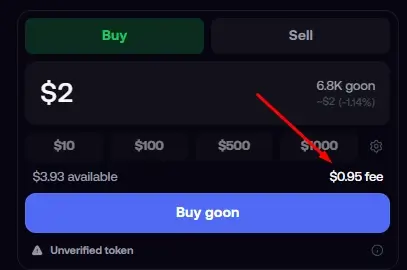
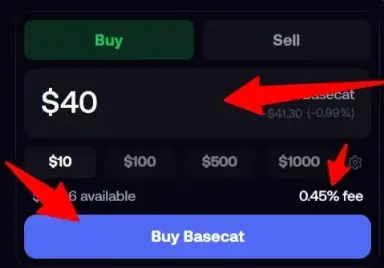
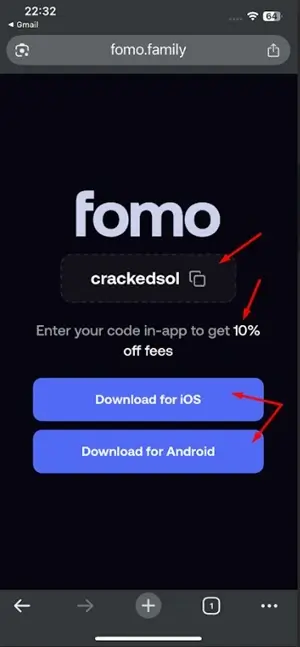
Creating an account with a referral link/code reduces the platform trading fee to 0.45% for all your trades.
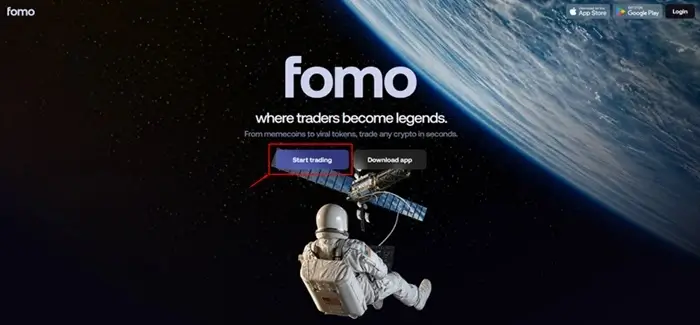
To create an account on a desktop or computer, go to the official FOMO webpage at FOMO.family.
If you are a mobile user, you can use the webpage as well or download the app [for Android and Apple] for an easier setup.
Let’s see how to do it below.
1. Go to the FOMO official website at Fomo.family and select “Start trading”.
2. Select account setup details [Google or Apple ID].
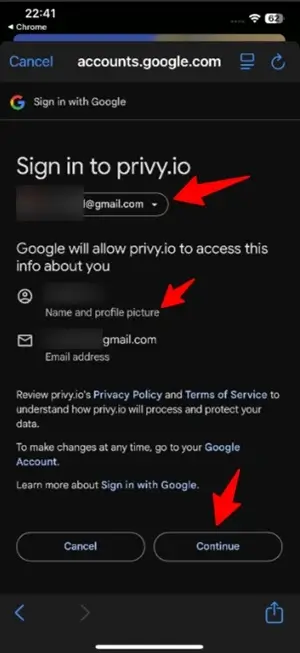
3. Approve the chosen account for the verification/setup process.
4. Log in to your new account and see your feed and other features.
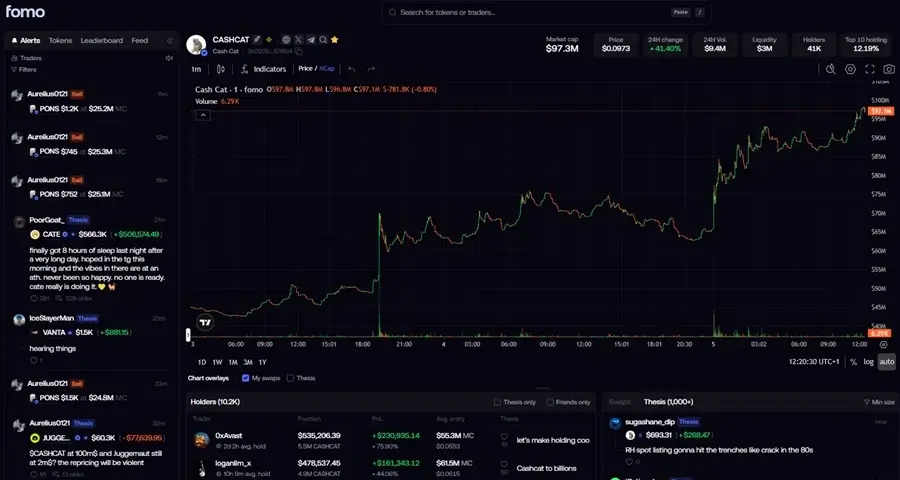
Click here to sign up with a referral Link [get 10% off on trading fees]
Need the full sign-up walkthrough? See our FOMO App Sign Up guide.
2. Log In
You can log in to your FOMO account using mobile or desktop.
On desktop, use your browser and log in via FOMO.family.
On mobile, you can log in using the same webpage on your mobile browser or, even better, use the already downloaded FOMO mobile app. If you haven’t downloaded it yet, download the app first.
To get started:
- Open the FOMO App or the web version at Fomo.Family.
- Select Log In.
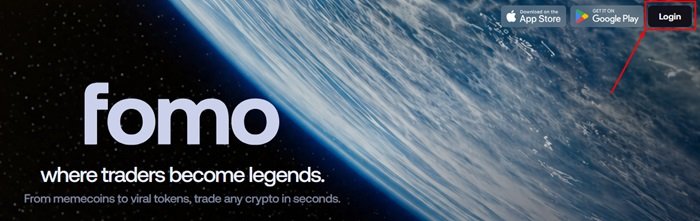
2. Choose the same login account [Google or Apple ID] used when creating the account.
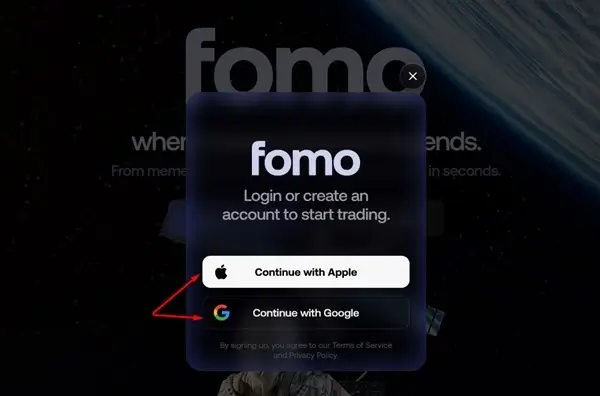
3. Access your FOMO account. That is all.
3. Set Up Your Profile
- Enter A Profile Name
As soon as you sign up and move on, you will be prompted to enter a preferred profile name you wish to use. Enter a name and move on.
And if you are not ready to do it now, do it later on your profile.
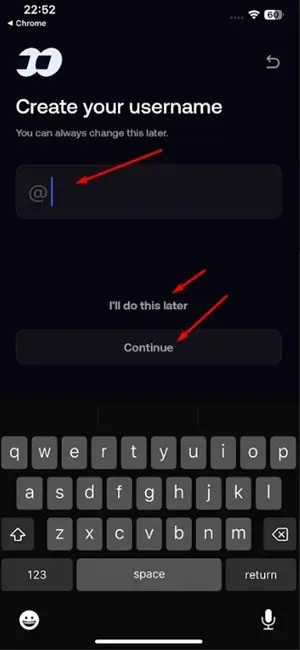
Note that the name you use is what will be used on your referral code link when you share with friends and family to sign up on Fomo. For example, “https://fomo.family/r/crackedsol”
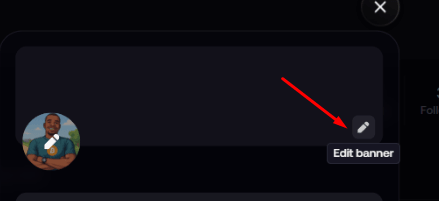
- Change Profile Banner
Look at the top right and click the biro pen icon to select and change your profile banner.
- Change Fomo DP – Profile Picture
Click on your profile [bottom right] and click on the image gear/ballpen [top left].
Select the preferred image from your phone.
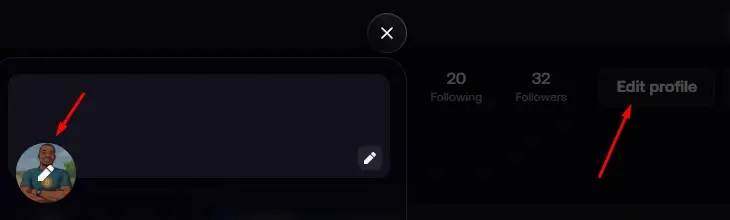
You can grant access to your phone should this pop up [to enable you to choose an image].
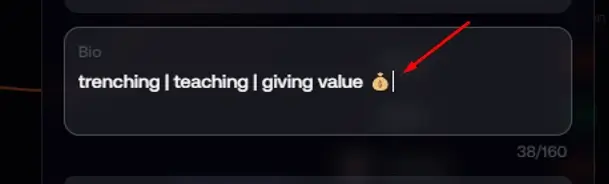
- Set Profile Description
Enter a preferred description so new traders can be motivated to follow you [optional].
- Connect account to Twitter [X]
You can claim your username and find friends [optional]
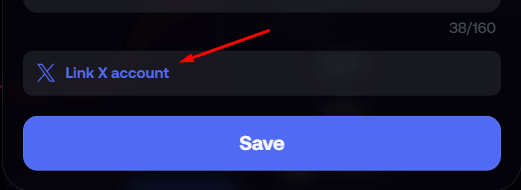
For all the settings, click on “Save” to make the selections permanent.
4. Set up your wallet
Since the FOMO wallet is a non-custodial wallet, there isn’t much to set up or import, unlike with Phantom wallets.
The only key step is to export your private keys as a security measure and store them offline.
- Set up and export private key
Private key is an unchangeable password to easily access your account from anywhere and any device. If you lose your phone, you can use the private key on another device and access the account.
Also, if someone gets access, they can steal all of your funds.
Types of Private Keys on the Fomo Crypto App
If you are using the mobile app, you will see two wallet keys:
- EVM Wallet Key
- Solana Wallet Key
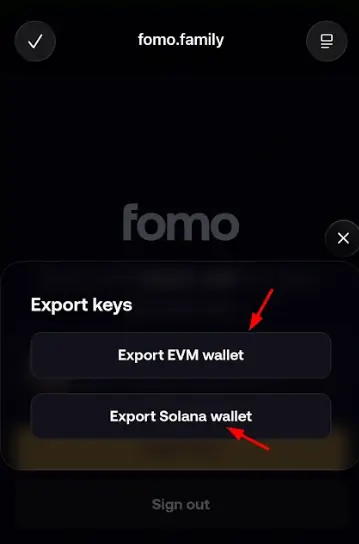
EVM Wallet Key – The EVM wallet key controls your entire wallet on the Fomo app, including your Solana wallet.
Solana Wallet Key – The Solana wallet key controls only your Solana wallet.
If you are using the desktop or web app, you won’t see the entire wallet key, such as the EVM key available on the mobile app. Instead, you will see separate wallet keys for different networks, including:
- Solana
- Monad
- Base
- BNB Chain
- Robinhood
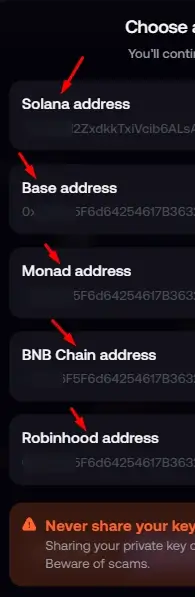
From here, you can export each wallet separately.
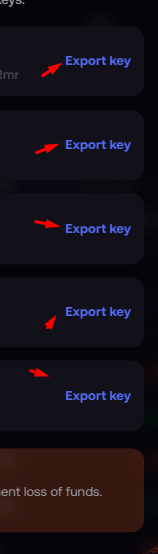
Important Note – Another thing to note is that there is no seed phrase available to copy on the desktop or web app. The seed phrase only appears on the mobile version.
Conclusion
If you want to view or copy your wallet seed phrase, you will need to use the Fomo mobile app.
- What is the best way to save your private key seed phrase?
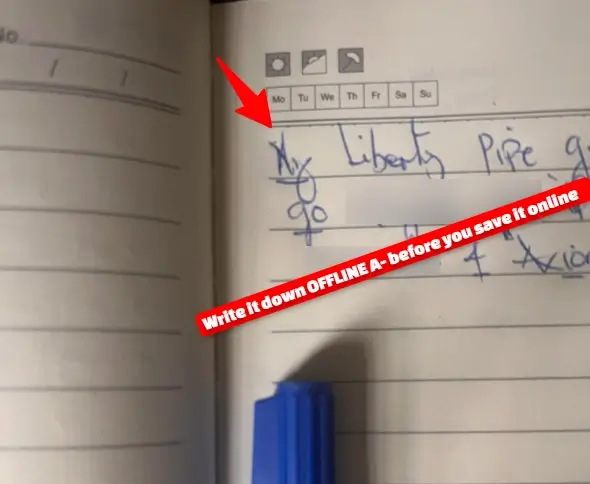
The best way is to write it down – offline.
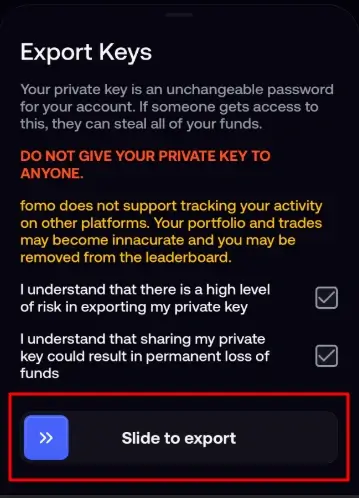
To export your private key on Fomo, slide the knob to the right-hand side > read the terms and accept > then slide to export > click export.
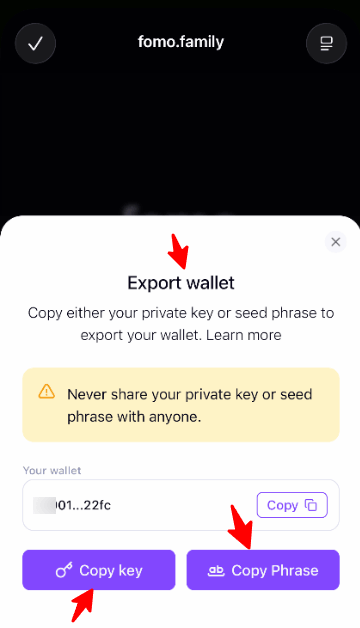
Two security credentials will be shown:
- Your private wallet key.
- Your wallet key phrase.
Acknowledge the security measures.
Then copy your private key and save it somewhere you consider safe, such as a password manager.
And write down your key phrase in a book or jotter and keep it in a secure place.
- Enable Face ID
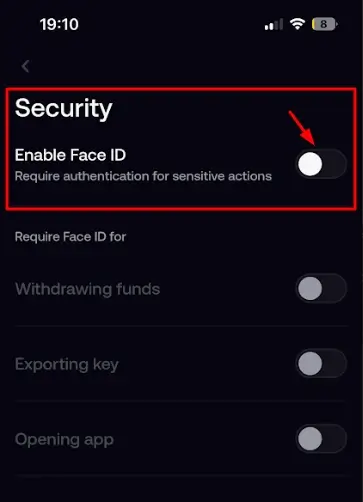
Face ID adds an extra layer of security to your Fomo account. It will be required when withdrawing, exporting the keys, and opening the app.
Still under Security, click on Settings, then click on “Enable Face ID.”
5: Create a Watchlist
Instead of trying to follow hundreds of cryptocurrencies, add projects that interest you to a personalized watchlist so you can easily monitor assets and recognize meaningful price movements and market trends.
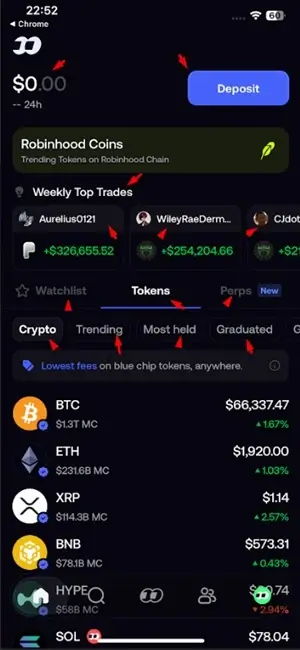
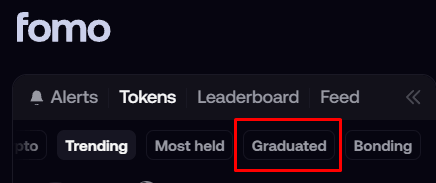
To see newly listed coins, go to the “Graduated” section.
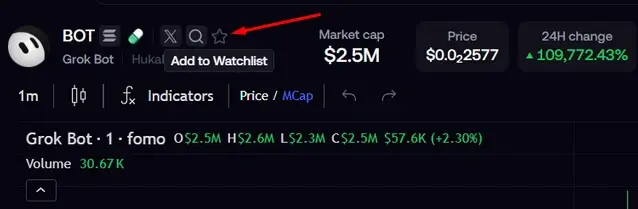
Look in the top right and hit the “Star” icon ⭐ to add to the Watchlist.
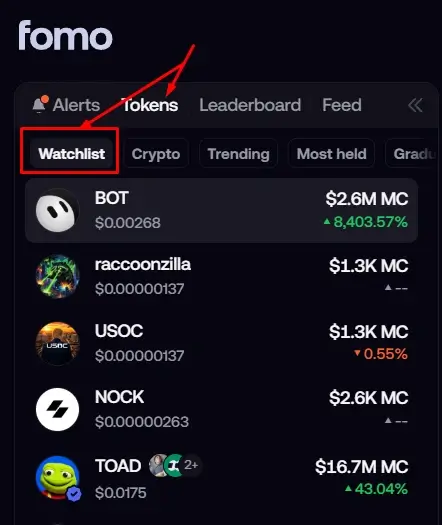
To see all tokens on your watchlist, on the dashboard, under Tokens, check the middle left, and you will see Watchlist.
6. Set Price Alerts
One of the app’s most useful features is customizable notifications. With that, you can set alerts for price increases, declines, or significant market activity so you don’t have to monitor charts constantly.
To do that, go to your profile, click the gear button, click on notifications, and select the notifications you wish to enable.
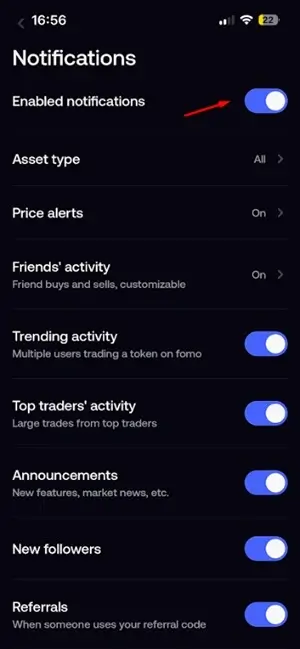
When you do, you will be notified when the KOLs you are following ape on a token.
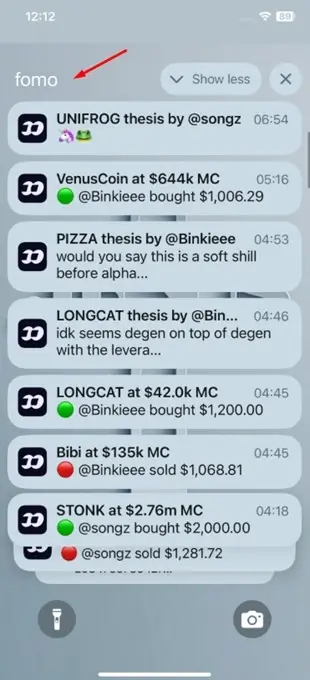
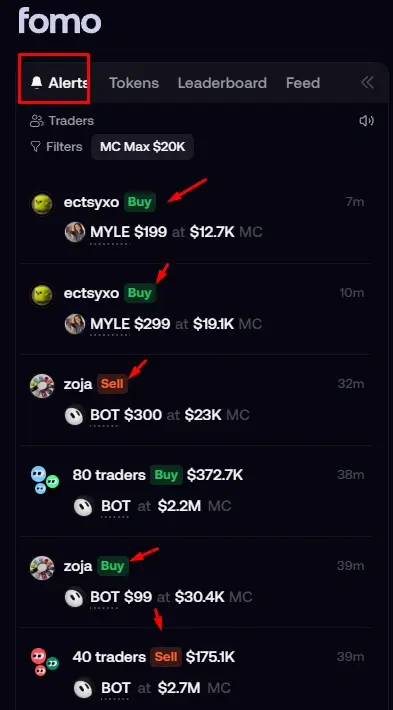
- Check Trade Alerts to see feed transactions
This section will show you a feed of what traders you are following are trading on – the buys and sells.
To see this section, go to the top left and click on “Alerts”.
7. Deposit Funds
To start trading on FOMO, you first need to deposit or add money to your account. You have several funding options, including Crypto, Card, and Apple Pay.
There is no minimum deposit amount, but the minimum amount you can trade is $2.
To Fund Your FOMO Account:
1. Go to your Profile and click Deposit in the top-left section.
2. Choose your preferred deposit method.
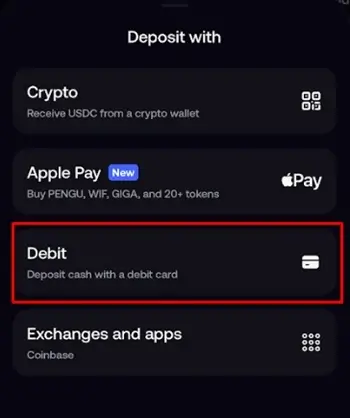
3. If you’re depositing crypto, select the appropriate asset and network. If Apple or Debit Card, select preferred options too.
4. Enter the amount and approve the deposit.
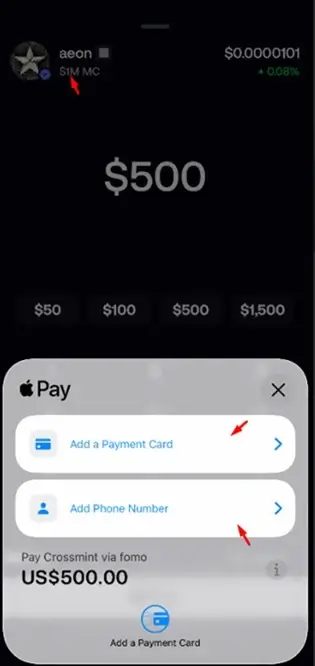
5. Wait for the funds to arrive.
8. Search for Tokens
On FOMO, you can trade blue-chip cryptocurrencies, stocks, commodities, and trending memecoins.
To trade blue-chip tokens, go to Crypto. To trade memecoins, go to Tokens. For commodities and stocks, go to Perps.
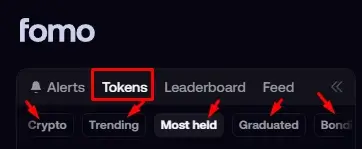
Ready to Search for Tokens?
1. Open FOMO’s token/search section.
2. Enter the token name, contract address (CA), or ticker.
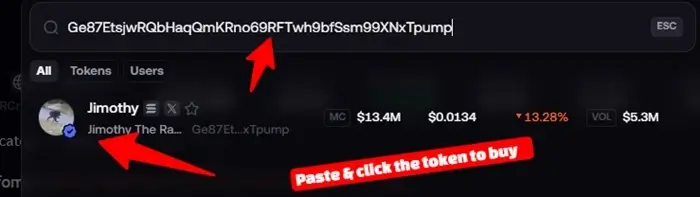
3. Select the correct token.
4. Open its token page.
5. Review the available information before trading.
9. Explore Trending Tokens
Trending tokens are tokens currently getting more attention from the memecoin community.
To get started:
1. Check the top left and click on the trending/discovery section.
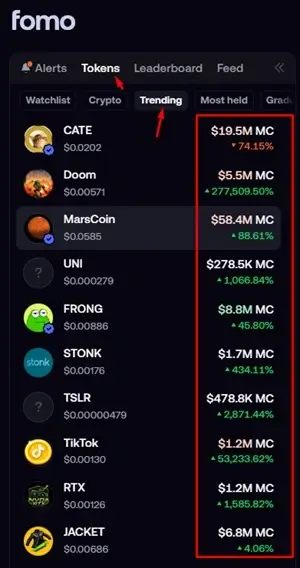
2. Browse tokens currently receiving attention.
3. Select a token you’re interested in.
4. Check its market data and liquidity.
5. Research it before making a trade.
10. Use Social Features
There are several social features on FOMO. You can follow a trader by going to their profile. You can also see the FOMO feed, where you can see what other traders are discussing and add their theses to your own trades, among other features.
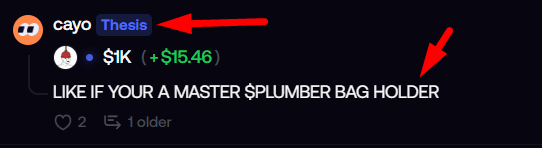
To follow a Trader:
1. Open FOMO’s social/trader section.
2. Browse other traders or activity.
3. Follow traders you’re interested in.
4. Review their activity or trades.
Use social information as research, not as a guarantee of profit.
11. Check Token Information
Token information helps you understand the narrative behind a particular coin. From there, you can check its social accounts and website, if available, to learn more about the project and what it offers.
Kindly note that some tokens do not have either a social account or a website. If that’s the case, be extra cautious, as the token may carry a higher risk of being a rug pull.
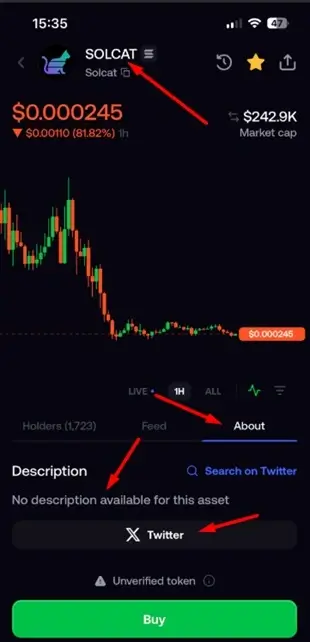
To see a token’s information, open its token profile and go to the About section. You’ll find the available information about the token there.
Here’s how to do it:
1. Open the token’s page.
2. Check its price and market cap.
3. Go to the About section and check the description.
4. Review the available website and social links.
5. Use the information to research the token before deciding whether to trade it.
12. Buy a Token
Once you’ve done your research and selected the token you want to buy, look down and you’ll see the “Buy” button.
Here is how to do it.
1. Select the token.
2. Choose Buy.
3. Enter the amount.
4. Review price, slippage, and transaction details.
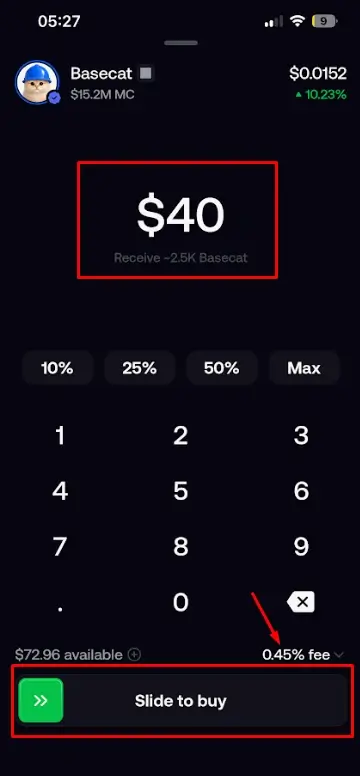
5. Confirm the purchase.
13. Set Slippage
On FOMO, you can’t manually set the slippage, as it is calculated automatically. What you can do is monitor the slippage and look for a favorable entry point before executing a trade.
How to Review Slippage Before Buying
1. Select the token you want to buy.
2. Find the Slippage information under the fees.
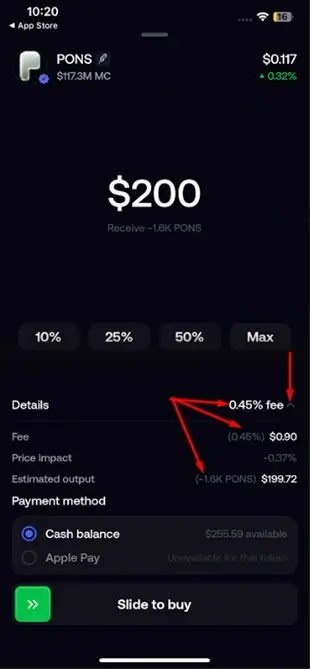
3. Review the slippage and watch how it changes.
4. Buy the token when the slippage is at a level you’re comfortable with.
Remember, higher slippage can result in a less favorable execution price.
14. Close a Trade
Closing a trade on FOMO means you’ve decided to sell your position, whether for a profit or a loss.
To do this, simply identify the asset position you want to close and click “Sell.”
That’s all.
Here is how to do it.
1. Open your active asset position.
2. Select Sell/Close.
3. Choose whether to close the entire position or part of the position.
4. Review the expected result.
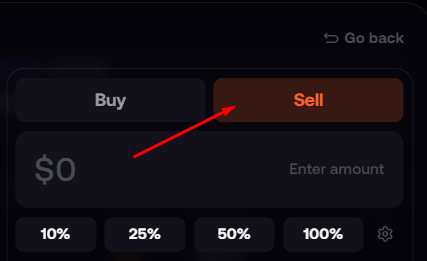
5. Confirm the transaction.
15. Monitor a Position
Monitoring your position means periodically checking whether you’re in profit, taking a loss, or the trade is simply stagnant.
To get started:
1. Open your portfolio or active positions.
2. Select the position you’re monitoring.
3. Check its current value.
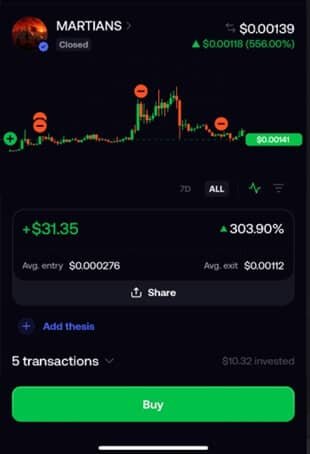
4. Monitor profit/loss and relevant market information.
5. Decide whether to hold, reduce, or close the position based on your strategy.
16. Check Your Balance
You can always check your FOMO App trading balance under your Profile or near the Deposit section of the app.
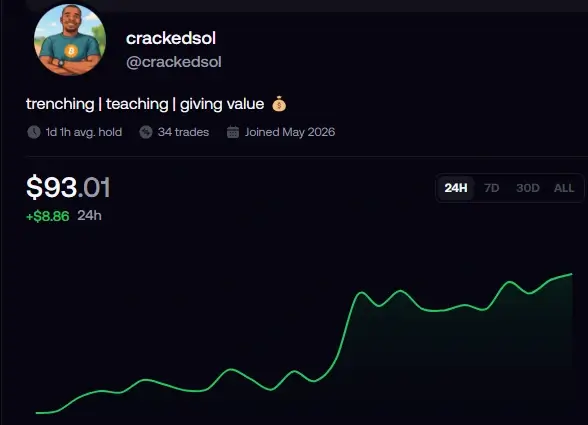
1. Open your FOMO wallet/portfolio.
2. Locate your available balance at your bottom screen [if on Desktop], and top right [if on mobile].
3. Check your individual asset balances.
4. Review your total portfolio value where available.
5. Check the balance before making trades or withdrawals.
17. Withdraw Money
FOMO allows you to withdraw your funds in several ways. You can use a bank if you’re in the US, Crypto, or other supported online apps.
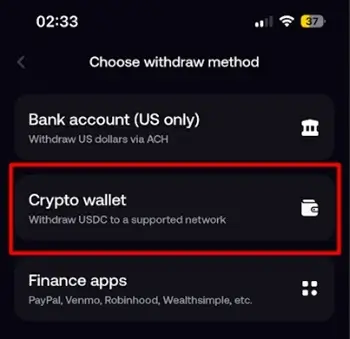
If you choose crypto, simply:
1. Go to Withdraw [check your middle right corner]
2. Copy the deposit wallet address from the platform or wallet where you want to receive your funds.
3. Select the network you want to use.
4. Go back to FOMO and paste the wallet address.
5. Select the same network.
6. Enter the amount you want to withdraw.
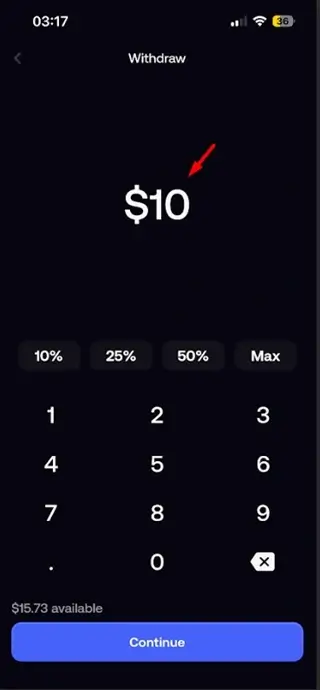
7. Confirm the withdrawal.
That’s it.
18. View Transaction History
Transaction history shows your activity on the FOMO App, including buys, sells, transfers, deposits, and withdrawals.
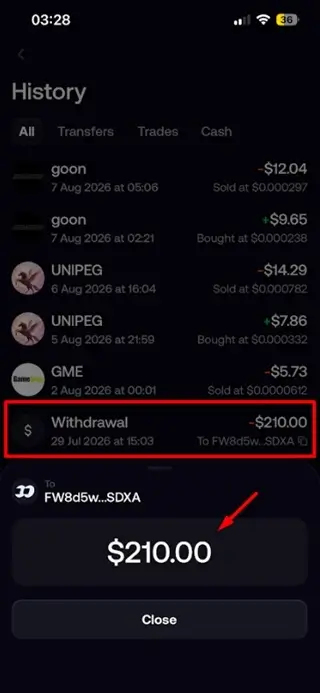
How to View Your Transaction History:
1. Open your Account Profile section.
2. Find your transaction history by clicking the “Recycle” button.
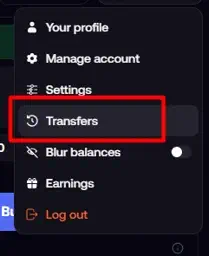
3. Review your previous trades, deposits, transfers, and withdrawals.
4. Open an individual transaction to view more details.
19. Send Gift Cash
You can send gift cash to other users on the FOMO App. Here’s how to do it:
1. Go to the profile of the trader or person you want to tip.
2. Click Send.
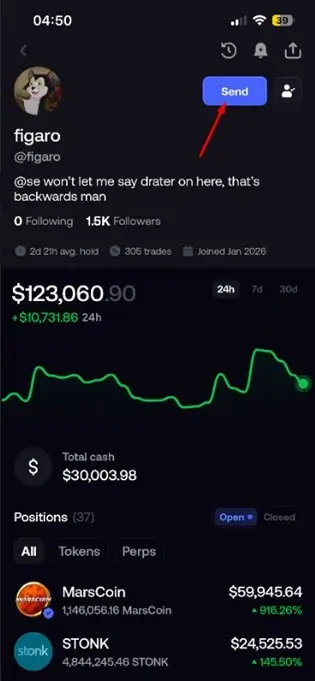
3. Enter the amount you want to send.
4. Approve the transaction.
That’s all.
20. Send Gift Cash
You can send gift cash to other users on the FOMO App. Here’s how to do it:
1. Go to the profile of the trader or person you want to tip.
2. Click Send.
3. Enter the amount you want to send.
4. Approve the transaction.
That’s all.
21. Copy Trading
Copy trading is the practice of copying the trades of successful traders in an attempt to replicate their results.
Copy trading on FOMO is manual, and it’s simple. Locate the trader you want to copy, follow them, and get notified when they make a trade. You can then decide whether to execute the same trade yourself.
Below is a summary.
1. See the leaderboard and browse available traders.
2. Review their trading activity/performance.
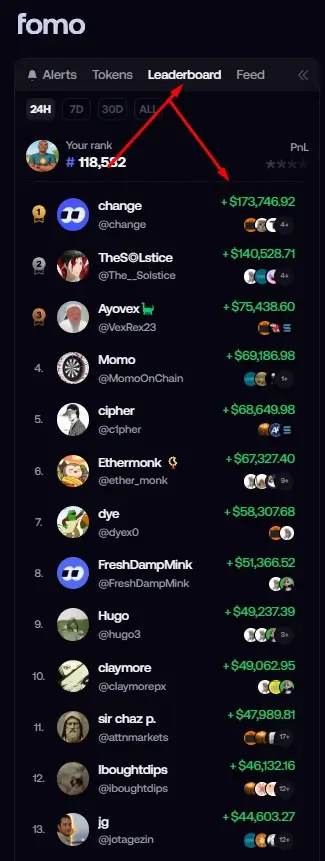
3. Select a trader you want to follow or copy.
4. Set up notifications under your profile to get notified when the trader makes a trade – Check step 6.
More on Copy Trading…
One of the biggest mistakes we make is following anyone who happens to be near the top of the leaderboard without looking at their consistency over time.
A trader who is up significantly this week because of one lucky memecoin trade is not necessarily the same as a trader who has built a consistent track record across hundreds of trades and multiple market conditions.
Past performance does not guarantee future results. Treat every trader you follow as someone whose decisions you still need to evaluate-not as a guaranteed source of profits.
A Real Example – I once saw a top-ranked trader with around 100,000 followers aping into a token that was already on my watchlist.
I was curious to see how the copy-trading feature would play out, so I decided to test it with just $5.
Guess what happened?
The trader sold his position, and the coin dipped shortly afterward.
Then, after the trader noticed that the token had started moving up again, he re-entered the trade-even though he had already exited his original position.
22. Use FOMO on Desktop
If you don’t feel like downloading the FOMO App for Android or iOS, you can still use the desktop version by going to FOMO.family.
From there, you can sign up, log in, and manage your account.
1. Open the official FOMO web platform at Fomo.Family.
2. Log in using your existing account.
3. Explore the desktop interface.
4. Access available trading and account features.
5. Use the same account rather than creating another one.
23. Fomo Referral Program
In addition to the best 7 ways of making money on the Fomo Family app, you can earn extra income by referring friends and family to the platform.
Simply share your unique referral link, and you’ll receive rewards when eligible referrals sign up and meet the platform’s referral requirements. It’s an easy way to generate additional earnings alongside your trading activities.
To get your referral code:
1. Go to your profile
2. Click on the gift box icon
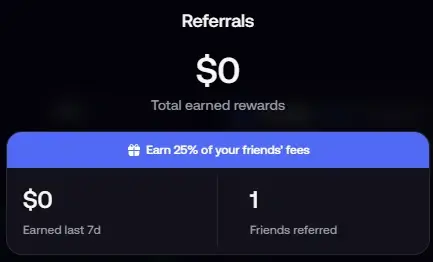
3. Copy your referral link and share.
P.S: Kindly note that there is a difference between the referral program and their affiliate program.
24. Contact Customer Support
FOMO provides answers to many frequently asked questions, so if you have a question or run into an issue, it’s worth checking the FAQ section first.
To access:
1. Click on Settings
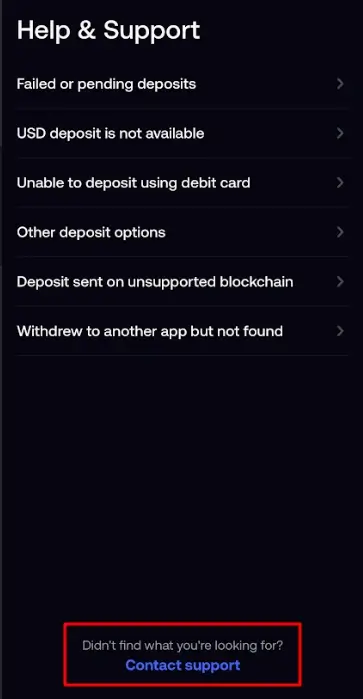
2. Click on “Help and Support”.
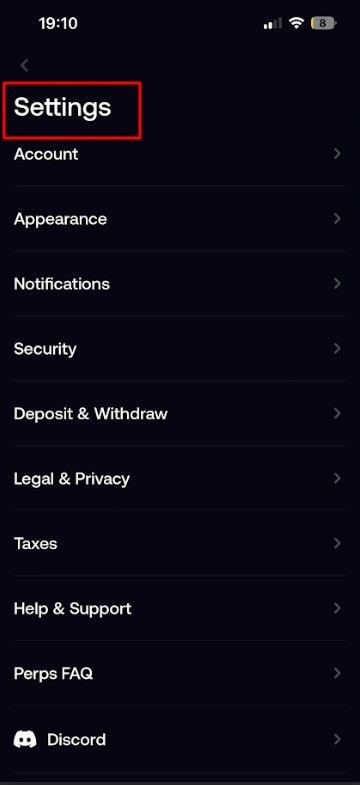
Click “Contact Support.”
When you click “Contact Support,” you’ll be redirected to your email, where a support ticket ID will automatically be generated for you. Delete the automatically generated email content.
3. Describe your queries.
Write a clear description of your questions or concerns. Be as specific as possible so the support team can understand the issue and assist you quickly.
Also, make sure to include your FOMO profile handle so the support team can identify your account and investigate the issue more efficiently.
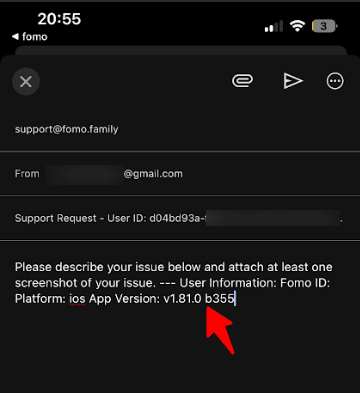
4. Submit
Once you’ve provided the necessary details, send the email and keep the support ticket ID for reference in case you need to follow up.
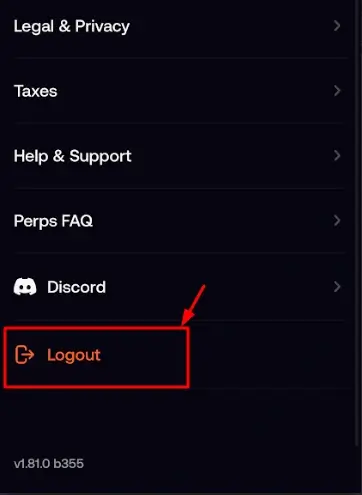
25. Log Out of the FOMO App
Logging out of the FOMO app is simple.
1. Go to Settings.
2. Scroll to the bottom of the page.
3. Click “Log Out.”
4. Confirm the action if prompted.
Common FOMO App Mistakes
Let’s discuss a few before we see some tips and wrap it up.
1. Trading Without Researching a Token
Researching a token before you ape in is an underrated step you need to master if you want to trade the trenches successfully.
For instance, how do you know a token could be a rug pull? If a newly launched token is moving sharply up and down on the chart without any clear reason, it could be a potential rug. Walk away.
Read our guide on how to trade memecoins to see how I research tokens using narratives and other methods.
2. Ignoring Liquidity
Liquidity tells you how easily you may be able to sell a token based on the available liquidity in the pool relative to the token’s market cap and trading activity.
Let me explain it for you.
Suppose you invest a large amount of money into a token with a relatively small liquidity pool. Even if the FOMO app shows that your position has made $50,000, that does not necessarily mean you can sell the entire position for $50,000.
For example, if the liquidity available is $100,000 and your position is large relative to that pool, attempting to sell your entire position could significantly move the price. You may therefore receive substantially less than the displayed value of your holdings.
On the other hand, if your position is small compared with the available liquidity, your sale is likely to have a much smaller impact on the price. Think of it as taking a cup of water from a large bowl versus trying to empty a large portion of the bowl at once.
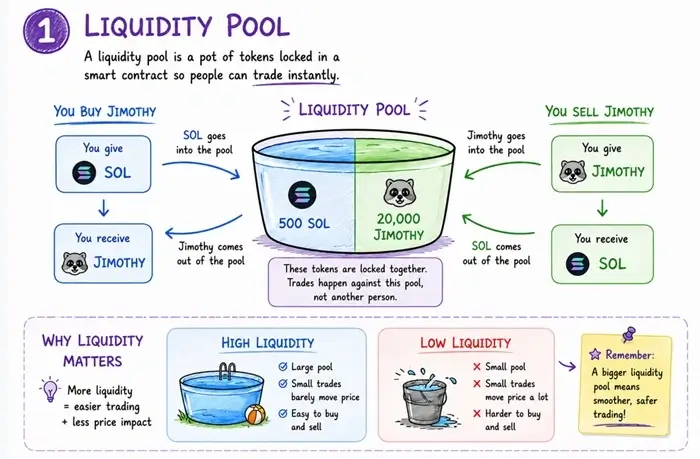
This is why the value displayed in your portfolio should not automatically be treated as the amount you will actually receive when you sell.
If liquidity is still confusing, don’t worry, you’ll learn more about it in Rektocracy.
To help calculate liquidity, use a memecoin profit calculator.
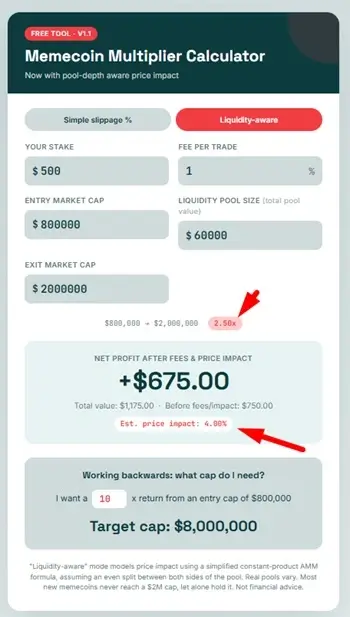
Using the Solana Memecoin Calculator
So, how can you estimate the amount you may actually receive when selling a position?
Go to the calculator here and enter:
- Entry market cap
- Exit market cap
- Slippage
- Liquidity pool
- Amount invested
Once you enter these figures, the calculator will estimate your possible sell-out amount and show you whether your position could have a significant impact on the available liquidity.
If the position is likely to affect the trade significantly, the calculator will indicate why.
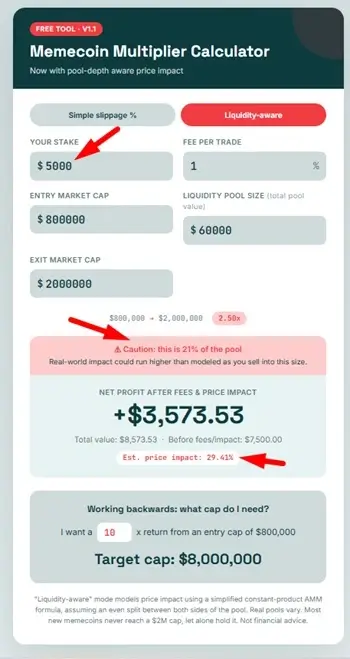
This is an important part of memecoin trading: paper profits are not the same as realized profits. Always consider liquidity, price impact, and slippage when determining how much you can realistically exit from a position.
The larger your position is relative to the available liquidity, the more important these factors become.
Always check the liquidity before entering a trade.
3. Using Excessive Slippage
One of the concerns when trading memecoins is excessive slippage. While you don’t control the market conditions that cause it, slippage can sometimes be unpredictable.
For example, if you intend to buy a token with $50, your actual execution may differ from what you expected because of price movement and available liquidity.
That’s why I recommend monitoring the slippage before entering a trade so you can aim for a better fill and get more value for your money.
4. Risking Too Much on One Trade
Risk is a universal part of trading, so you need to manage it properly.
If you haven’t read The Psychology of Money, it’s worth reading to understand money management. If you try to learn risk management while throwing large amounts into memecoin trades, it may not end well.
5. Following Other Traders Blindly
Following a trader is okay, but you need to understand that every trader has their own interests and goals.
No one is looking out for your money the way you should. A trader may exit a position while you’re still holding, leaving you with the loss.
So, follow-but don’t follow blindly.
By all means, read our guide on how to trade memecoins.
6. Sending Funds Through the Wrong Network
Sending funds through the wrong network can result in permanent loss of funds, so always double-check the network before proceeding.
Make sure the receiving network matches the network you select when sending. Take a moment to verify the address, asset, and network before confirming the transaction.
FOMO App Tips for Beginners
1. Set a Position Limit
Set a personal limit for how much of your total trading funds you are willing to put into any one token. Before you buy a trending coin, take a moment to ask yourself:
“Would I still buy this token if it wasn’t trending right now?”
If the answer is no, you may be reacting to FOMO rather than following a trading thesis.
2. Diversify
Unless your account balance is small and you’re trying to build, it is also wise to avoid putting your entire trading balance into a single cryptocurrency or a single trade.
For example, if you have a $1,000 trading portfolio, you might decide to start with a much smaller position, such as $100, while keeping the remainder available for future opportunities.
If your first trade goes badly, you still have capital available to learn 9x more from the experience and look for another opportunity.
Always preserve your ability to trade another day…
3. Take Out Your Original Capital When You’re in Profit
One strategy I use when a trade moves significantly in my favor is to take out my original capital and let the remaining position ride.
For example, if I invest $100 and the position generates a 100% profit, my position is now worth approximately $200 before fees, slippage, and price movement.
At that point, I may choose to withdraw my original $100 and leave the remaining $100 in the trade.
–
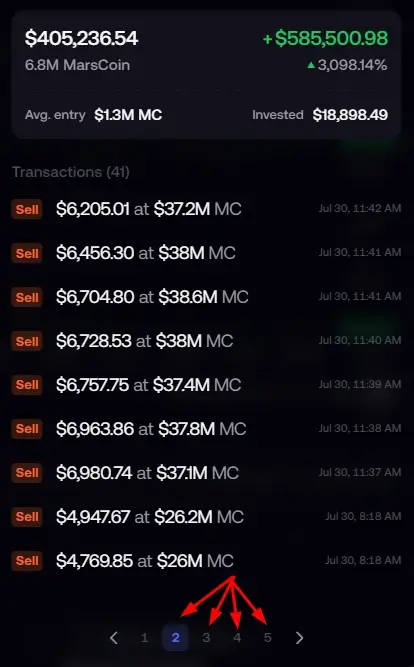
This means my initial capital has been taken off the table, while I still have exposure to any further upside.

There is a 50%, 30%, and 10% exit strategy in Rektocracy – check it out to know the best exit strategy.
4. Research Before Buying Trending Coins
One of the easiest mistakes for a new trader to make is buying a cryptocurrency simply because it appears on a trending list.
Popularity is not the same as value.

Before you ape into a coin, do your own research.
5. Never trade with money you cannot afford to lose.
Never commit your entire account balance to a single position.
The exact amount should depend on your personal financial situation and risk tolerance. There is no universal “correct” position size.
As you gain experience and become more confident in your strategy, you can reassess your position sizing.
The key principle is simple: Don’t risk your entire portfolio trying to prove that one trade is right.
7. Never Download Unofficial Versions of the App
Scammers frequently create fake apps, websites, links, and social-media accounts designed to steal users’ funds or keyphrases.
As of the time of writing, FOMO’s official website directs users to its official app and web experience. The official website is: fomo.family
- Do not download supposed FOMO APKs or modified versions of the app from third-party websites.
- Be especially careful with links shared through unofficial Telegram groups, DMs, or other communities. Do not assume that a link is legitimate simply because someone claims to represent FOMO.
- FOMO itself warns users about the broader risks of scams in crypto, and its official site is the safest starting point for accessing the platform.