How to Deposit on FOMO App: Step-by-Step Guide (2026)

If you’ve just created your Fomo account, the next step is funding your wallet so you can start trading cryptocurrencies, memecoins, perpetuals, and other supported assets.
Fortunately, depositing money into the Fomo App is one of the easiest parts of getting started.
Unlike many traditional cryptocurrency exchanges that require lengthy verification processes before you can even make your first deposit, Fomo app lets you fund your account within minutes using several payment options.
So, whether you’re transferring cryptocurrency from another wallet, buying crypto with your debit card, using Apple Pay, or moving assets from another exchange, the process is designed to be quick and beginner friendly.
That said, making a crypto deposit is different from sending money to a normal bank account, or trenching.
Because FOMO operates as a self-custodial trading platform, your deposits are sent directly to your wallet rather than into an account controlled by the company. This gives you complete ownership of your assets, but it also means you’re responsible for sending funds correctly.
And as such, a single mistake, such as sending tokens through the wrong blockchain network, can permanently destroy your funds.
That sounds scary.
Fortunately, it is very easy to avoid.
In this guide, I’ll show you exactly how to deposit on the FOMO App, the different payment methods available, how long deposits take, the fees you should expect, and the common mistakes every beginner should avoid.
If you’re completely new to the platform, I recommend first reading our What Is FOMO App, and FOMO App Review guides before making your first deposit. Those articles explain how the platform works and what you should know before risking any money.
How Deposits Work on the FOMO App
Before clicking the Deposit button, it’s important to understand what actually happens when you fund your account.
Many beginners assume FOMO works like Binance, Bybit, or Coinbase, where the exchange temporarily holds your money in a centralized account.
That isn’t how FOMO works.
FOMO is built around a self-custodial wallet.
That simply means you own your wallet-not FOMO.
Instead of depositing money into a company-owned account, you’re sending cryptocurrency directly into a wallet whose private keys are controlled by you.
Think about it this way.
Using a traditional crypto exchange is like depositing cash into your bank account, while using FOMO app is more like putting cash into your personal safe at home.
The company provides the application that lets you access and manage your assets, but they do not own them.
This has several advantages.
- Your funds cannot simply be frozen because a centralized exchange suspends withdrawals.
- You maintain complete control over your assets.
- You can transfer them whenever you want.
But it also means there’s no customer support agent that can reverse a transaction if you accidentally send your cryptocurrency to the wrong address.
That’s why understanding deposits before sending your first transaction is extremely important.
What You Need Before Depositing
Funding your wallet only takes a few minutes, but there are a few things you should prepare beforehand.
1. A Verified FOMO Account
Before depositing, make sure you’ve successfully created your FOMO trading account.
You can sign up using either your Google account or Apple ID, making registration much faster than many traditional exchanges.
If you haven’t created an account yet, follow our complete 1-minute guide here ⏰
2. Internet Connection
Since cryptocurrency deposits are broadcast to the blockchain, a stable internet connection is essential to avoid switching networks while confirming transactions.
3. Money to Deposit
You should have the money you wish to deposit ready.
The Fomo app supports many funding options;, card, crypto wallet, and more. So, no worries here.
4. Basic Knowledge of Wallet Addresses
If you’re transferring cryptocurrency from another wallet or exchange, you’ll need to understand wallet addresses.
A wallet address is similar to a bank account number. Instead of receiving Dollars, it receives cryptocurrency. And every blockchain has its own wallet address.
For example:
- Solana uses Solana addresses.
- Ethereum uses Ethereum addresses.
- Base uses Base addresses.
- BNB Chain uses BNB addresses.
One of the biggest mistakes beginners make is sending cryptocurrency to the wrong blockchain.
For example: Imagine sending SOL through the Ethereum network instead of the Solana network. The transaction may complete successful…but the funds may never reach your wallet.
That’s why you’ll always want to confirm that both the sending and receiving networks match before clicking Send. We’ll cover this in detail so you do not make any mistakes.
Which Deposit Methods Does FOMO Support?
FOMO app currently supports several funding methods which include, Cryptocurrency transfer, Debit card purchase, Apple Pay, and Supported exchange transfer – Coinbase.
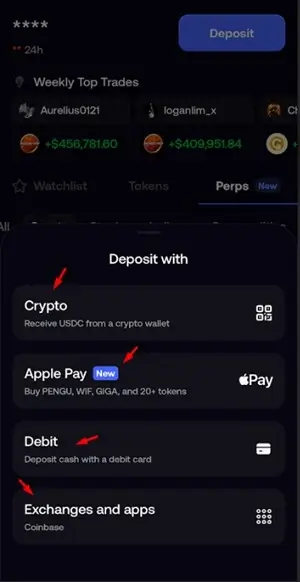
And while they support 4 deposit options, the available methods may also vary depending on your country and payment provider.
Also, depending on your location, you can choose whichever option is most convenient.
1. Deposit Using Crypto
This is the most common method.
If you already own cryptocurrency on another wallet such as Phantom, MetaMask, Trust Wallet, Backpack, or Gate.io, you can simply transfer those funds into your FOMO wallet.
While we explain other depositing routes, the Crypto option is the method we will use in the guide because blockchain transfers are usually fast and inexpensive, especially on Solana.
And this is the general method for all users in any country since other 3 are majorly for tier 1 countries.
2. Deposit Using Debit Card
If you don’t already own cryptocurrency, the FOMO app lets eligible users purchase crypto directly using a debit card.
Instead of buying crypto elsewhere first, the payment provider converts your card payment into cryptocurrency and deposits it into your wallet automatically.
For many beginners, this is the simplest way to get started.
3. Deposit Using Apple Pay
Apple users can also fund their wallets using Apple Pay in supported regions.
This provides one of the fastest onboarding experiences because payment authorization is completed directly through Apple’s payment system.
4. Deposit Using Coinbase
FOMO allows you to deposit using a centralized exchange, such as Coinbase.
Simply withdraw your cryptocurrency from your Coinbase account and send it directly to your FOMO wallet address.
Overall, we’ll be using a deposit method that has no deposit fee on the FOMO platform, depositing through cryptocurrency. Let’s get started.
Secret Deposit Hack on Fomo App
While the Fomo app accepts any token deposit on the Solana network, I recommend you deposit USDC only. You know Why? Because if you deposit, let’s say Solana, it will be deposited as Solana in your Fomo Wallet.
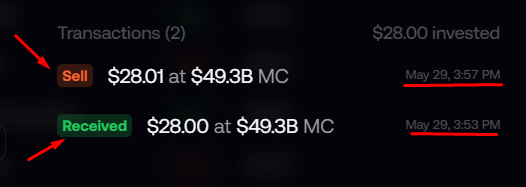
And you will have to convert it again to USDC-which is cash on Fomo – [this is not free]. Meaning, without converting any deposited token to USDC, you cannot trade on the platform.
That is why – USDC is even shown on the deposit address on Fomo.
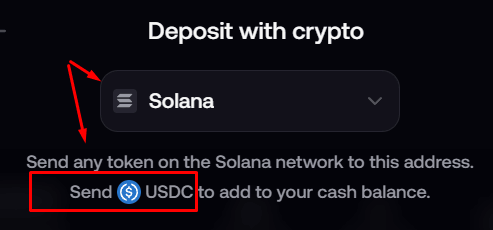
So, send USDC to Fomo to avoid extra fees on conversion.
Step-by-Step: How to Deposit on the FOMO Trading App
Now that you understand how FOMO wallets work, let’s walk through the actual deposit process.
We will go with the crypto method.
Step 1: Tap Deposit
After logging into your FOMO account, you’ll land on the main dashboard.
If on Desktop, go to profile, and click on Wallet.
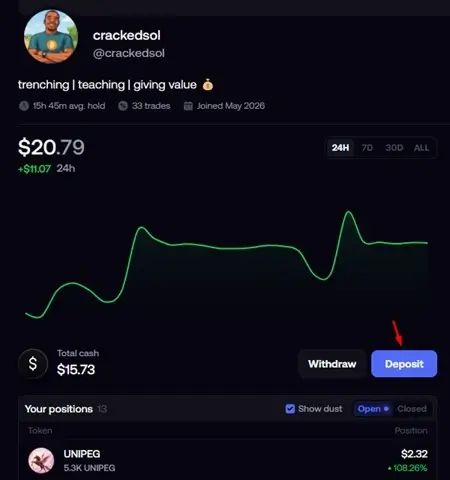
And if on Mobile, look your top right and hit “Deposit”.
This is where your cryptocurrency balances are stored and managed.
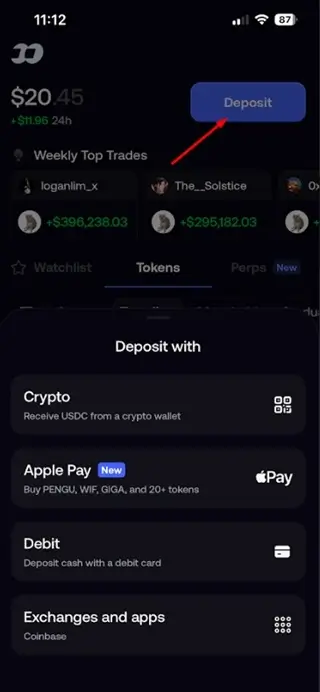
When you tap deposit, the app will now display the different funding methods available in your country.
Step 2: Choose Your Deposit Method
Choose Crypto Deposit. Examples include:
- Phantom
- Trust Wallet
- MetaMask
- Backpack
- Coinbase Wallet
If your crypto is on an exchange…
Choose the Crypto Deposit option and then withdraw from your exchange to the wallet address provided.
Examples include:
- Gate.io
- Binance
- Coinbase
- Bybit
- OKX
- Bitget
- KuCoin
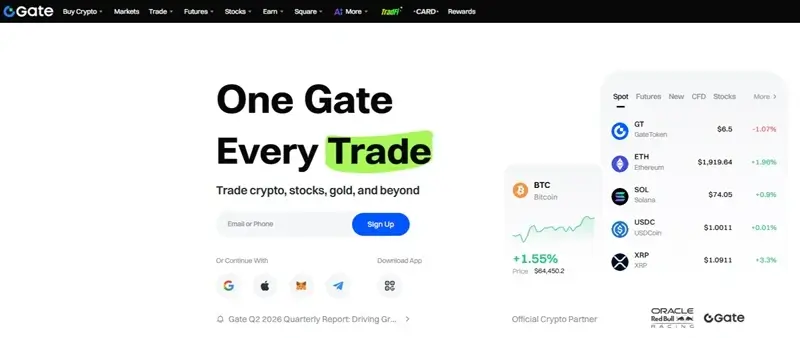
I will use Gate.io as my crypto wallet – you can replace this with yours; Phantom, Coinbase, Kraken, etc.
You can sign up on Gate.io here, or sign in here [if you already have an account].
Step 3. Buy USDC to Send to Fomo App
Once your account is set up, it’s time to fund it with USDC, which you’ll use to buy memecoins.
P.S. – If you already have USDC in your crypto wallet, skip to the next step. Or, if you have USDT, swap it for USDC and jump to the next step. If not, let’s see how to do it because this guide is for total beginners.
Gate crypto exchange, like other crypto exchanges, offer several funding options, so you can choose whichever is most convenient for you:
- P2P (Peer-to-Peer)
- Apple Pay
- Google Pay
- Bank Transfer
- Debit/Credit Card (where available)
- And other supported payment methods.
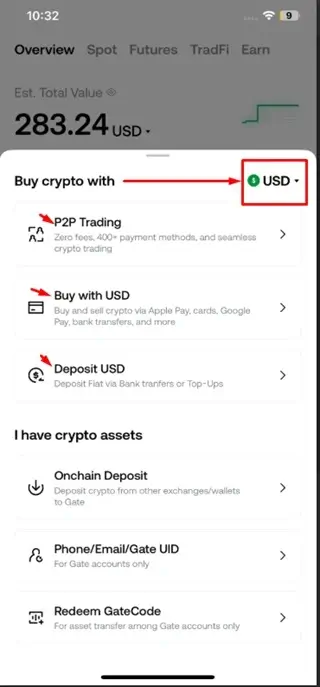
Choose the funding method that works best for you, complete the deposit, and once your USDC/USDT arrives, you’re ready for the next step.
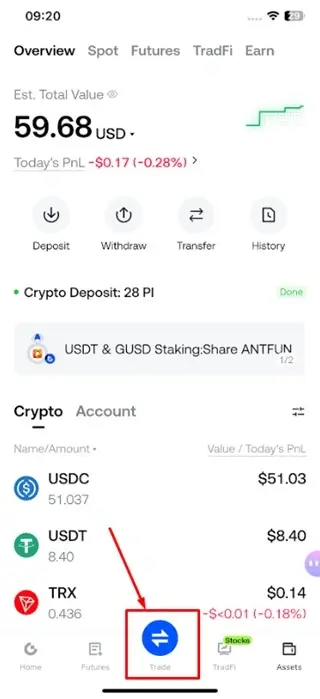
I bought USDT, so I will swap it for USDC [You can skip to step 4 if you already have USDC]
- Go to “Trade” on Gate.io
- Select the “USDC/USDT” pair.
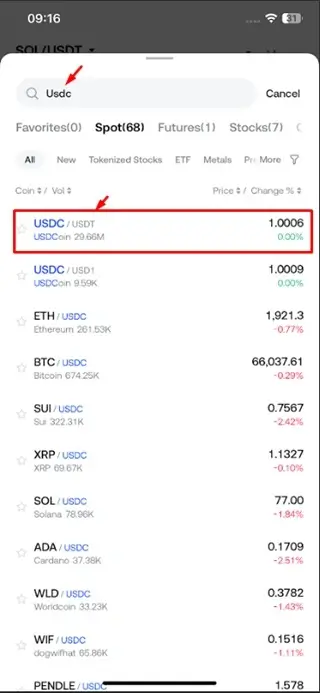
- Enter the amount you wish to swap and click on “Buy USDC”.
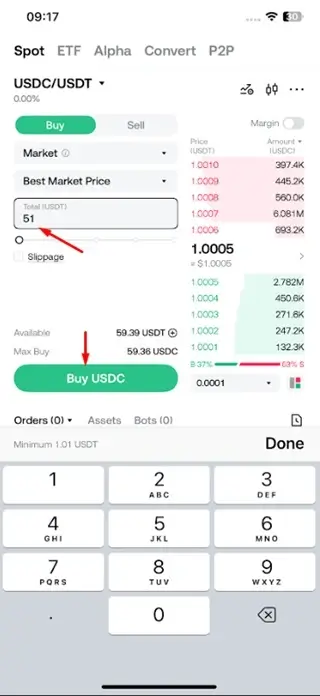
Now we have USDC – ready to transfer to the Fomo app.
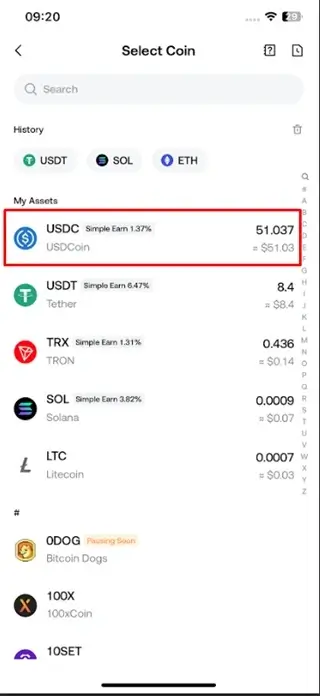
Let’s continue.
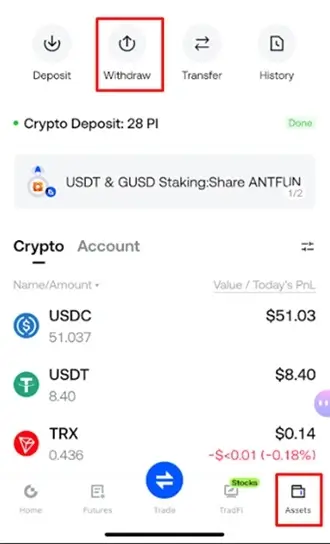
To move the USDC from our crypto wallet, we need to click Withdraw. Depending on the crypto wallet you are using, click on Wallet or Assets, and then click “Withdraw”.
- You will land on the withdraw page – so we can send out to Fomo
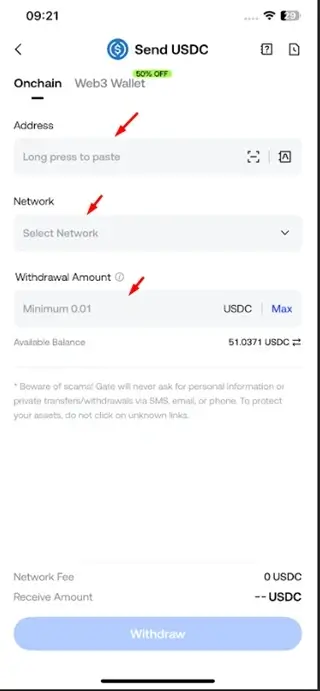
Step 4. Copy your Crypto wallet address on Fomo
ON Fomo, click on Deposit again, select a preferred network – I will go with Solana.
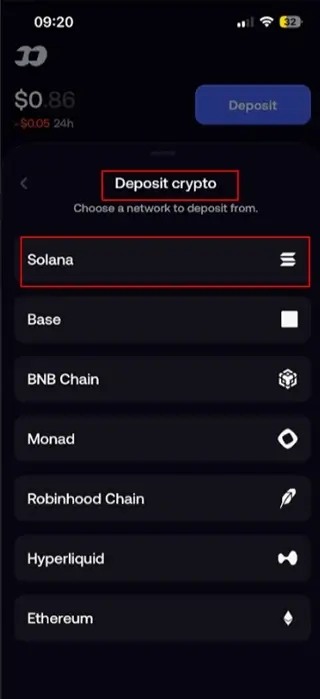
You can click and copy the wallet address or scan the QR code. Either is good.
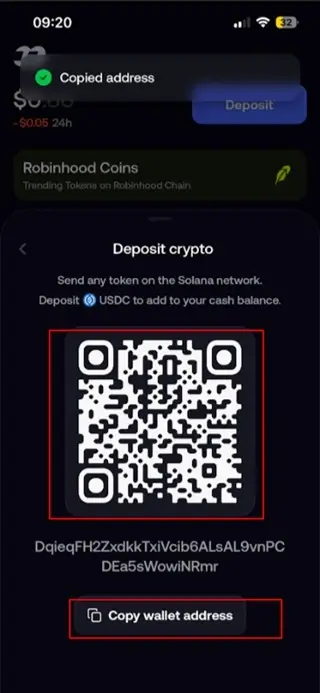
- If you scanned the QR code, the FOMO App deposit address will appear in your crypto exchange deposit section.
- Or if you want manual, just copy it out and paste it.
📌 Make sure you select the Solana network – if it is not already automatically selected. See it on Gate.io below.
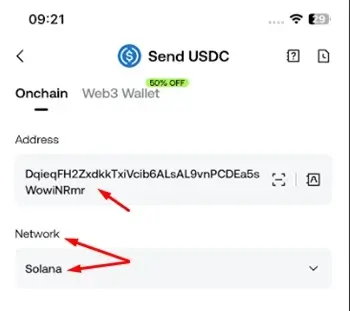
Step 5. Enter the amount and send
Enter the amount you wish to send, confirm your entries, and click on “Withdraw” to move the funds to your FOMO account balance.
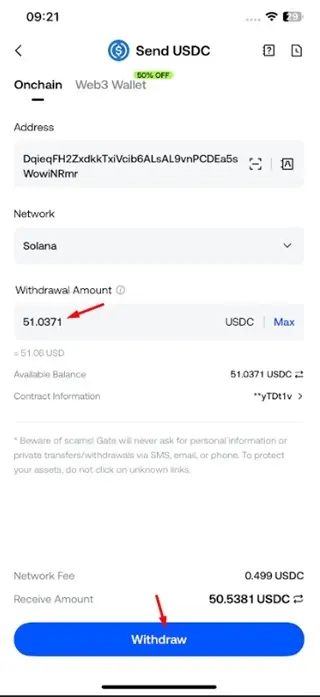
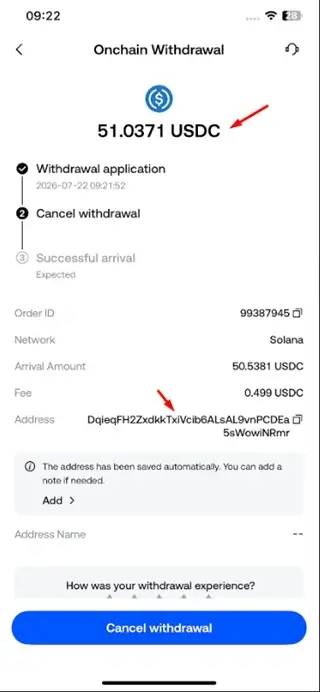
Step 6. Receive and confirm the deposit on Fomo
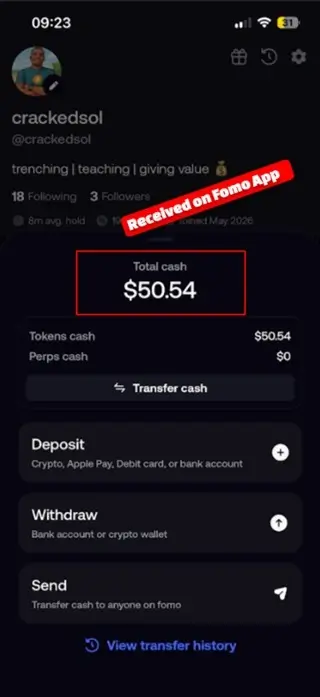
The transfer usually takes less than two minutes.
For example, in the screenshots below, the withdrawal was initiated at 9:21 on Gate, and the funds arrived in the Fomo App by 9:23.
That’s how fast on-chain transfers can be when everything is set up correctly.
Once your USDC arrives in your Fomo wallet, you’re ready to start trading memecoins.
That is the whole process of depositing using crypto-on any crypto exchange like Coinbase, Binance, etc., or a custodial wallet like Phantom, Backpack, etc.


Alternative methods to Add Money to Fomo Crypto App
For those in Tier 1 or complete beginners who do not want to use crypto, these are alternative ways to deposit.
Method 2. Fund Fomo App with a Debit Card
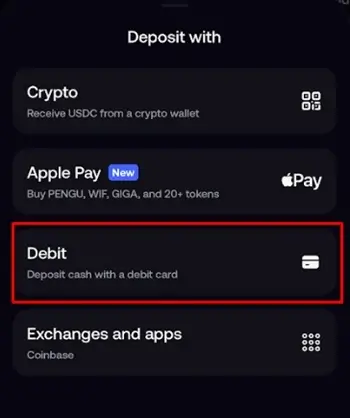
Inside the Deposit page: Choose Debit Card.
- Enter the amount of cash you wish to purchase.
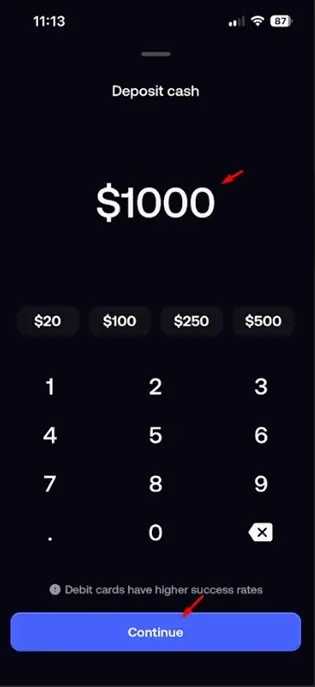
The advantage of this method is that you are depositing USDC as cash directly. No need to buy USDT/USDC externally before converting it to crypto and then sending it to your FOMO app.
When you enter your amount, the app will redirect you to the payment provider—Mercuryo.io.
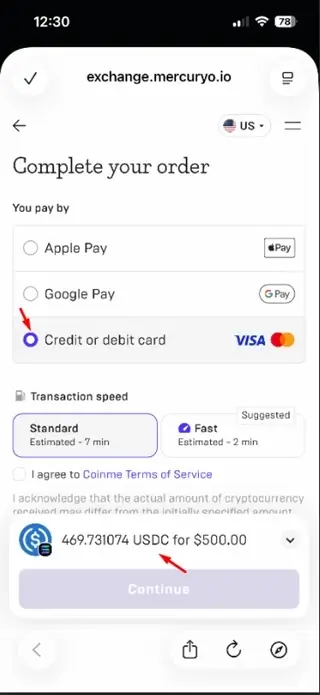
You’ll then:
- Enter your debit card details.
- Complete any bank verification (such as OTP or 3D Secure).
- Approve the payment.
Once approved, the cryptocurrency is purchased automatically and deposited into your wallet.
The entire process usually takes only a few minutes.
Method 3: Deposit with Apple Pay
Apple Pay follows a different approach. Here is how it works.
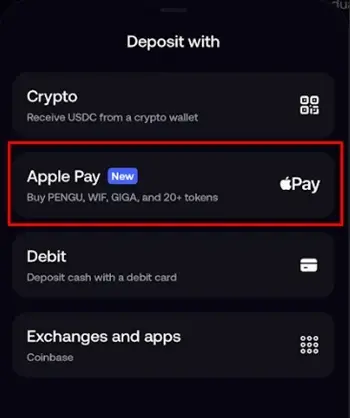
With Apple Pay, you are not depositing money into your FOMO app. Rather, you are buying memecoins directly. The disadvantage is that you are limited to the trades you take because only about 40+ tokens are available for direct purchase.
For instance, if you click on “Apple Pay,” you will be prompted to select a token you want to buy with Apple Pay.
Another downside is that you can only buy verified and popular memecoins.
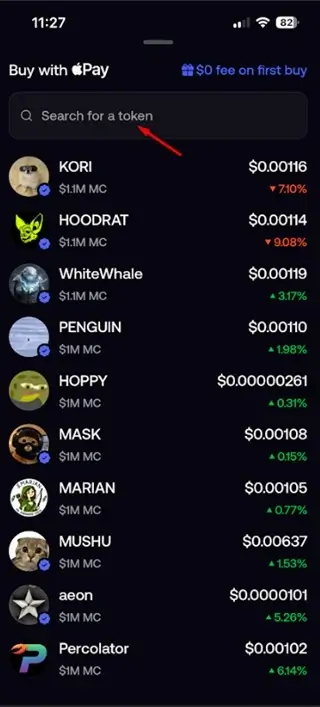
From there, enter the amount you want to buy the token. Then click on “Pay” at the bottom.
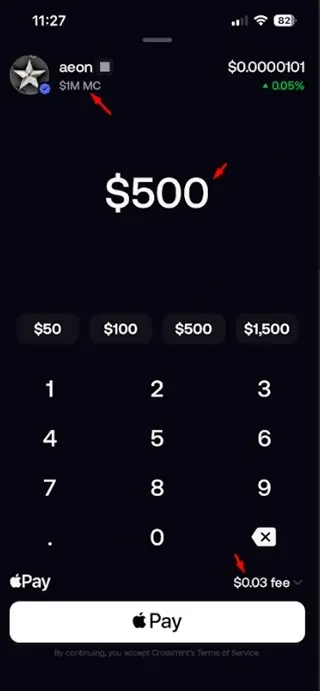
- Add a payment card to your Apple Pay (if you haven’t before) or use your phone number.
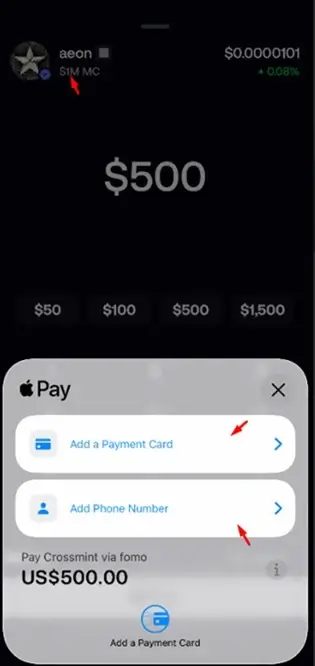
After confirmation:
- The payment provider purchases the cryptocurrency.
- The crypto is then deposited directly into your FOMO wallet.
If Apple Pay isn’t available, don’t worry about it. Just use Method 1 or 2. And if Method 2 is also not available, use Method 1-it generally works for all countries.
How Long Does It Take to Deposit on Fomo?
One of the advantages of using FOMO is that most cryptocurrency deposits arrive quickly. However, the exact timing depends on the funding method and options used.
Deposit Fees on Fomo App Deposits
This is another question people ask frequently. The answer depends on how you’re depositing.
1. Crypto Transfers
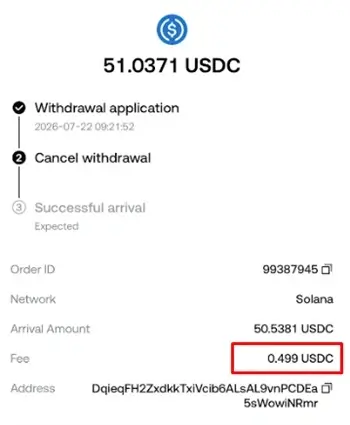
- Depositing USDC using the Solana network – $0.499 fee [based on my experience].
FOMO itself does not charge a fee simply for receiving cryptocurrency.
However, you’ll still pay the normal blockchain network fee charged by the wallet or exchange you’re sending from.
For example: Sending SOL usually costs only a tiny fraction of a dollar. Ethereum transactions, on the other hand, can sometimes become much more expensive during periods of heavy network activity.
2. Debit Card Purchases
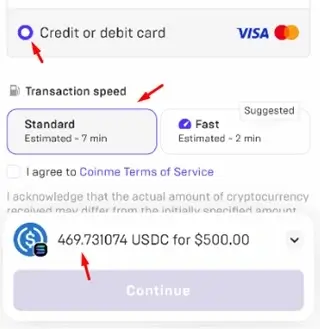
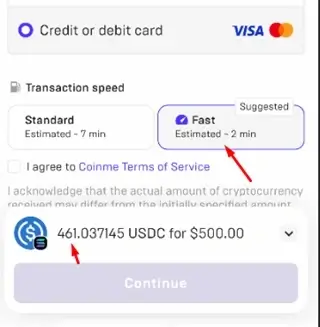
- “Standard” USDC card deposit fee is about “6.05%, while the “Fast” deposit method is 7.79%
If you deposit: $500.00 – Standard Method,
You receive: 469.731074 USDC
Amount charged:
$500.00 − 469.731074 = $30.268926
Percentage charged:
(30.268926 ÷ 500) × 100 = 6.05%
If you deposit: $500.00 – Fast Method,
You receive: 469.731074 USDC
Amount charged:
$500.00 − 469.731074 = $30.268926
Percentage charged:
(30.268926 ÷ 500) × 100 = 6.05%
The same applies to all deposit amounts on “Standard and Fast” transfers.
3. Apple Pay
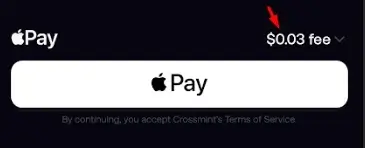
Apple Pay memecoin purchase or trading fee on the Fomo app is $0.03 [based on prevailing circumstances].
Is There a Minimum Deposit on the FOMO App?
There is no platform-wide minimum deposit requirement. However, before you deposit, you need to consider that every blockchain transaction has a network fee.
For instance, if you deposit only $2 worth of crypto and pay $0.50 in fees, you’ve already lost 25% of your money before placing your first trade.
For new members, it’s often more practical to deposit an amount that allows you to trade comfortably while keeping fees relatively insignificant.
As for those already in crypto, you can deposit $1,000, $10,000, $100,000, and as much as you want.
The thing is, it is easy to make $1,000 fast on the FOMO app when you are trading with a deposit amount of $500 compared to starting with $10.
For instance, while I was testing a narrative on a token, I traded with $8 and made a profit PNL of 135%.
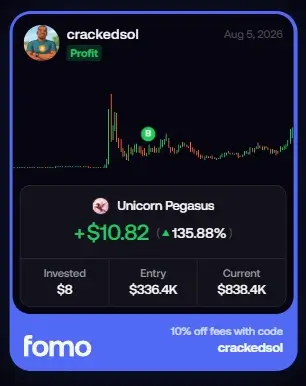
Now, imagine how many times it will take to reach $1,000, let’s say, 100 trades with a winning PNL of 100% per trade.
But with a deposit of $500, I would have made $1,500 in the same trade. Which would make me a good trader.
The same applies for $10,000-I would have made $15,000 more and closed for the day or week instead of opening 100 more trades with a smaller amount. I hope you get the point.
With a bigger amount, you easily beat overtrading, which is bad.
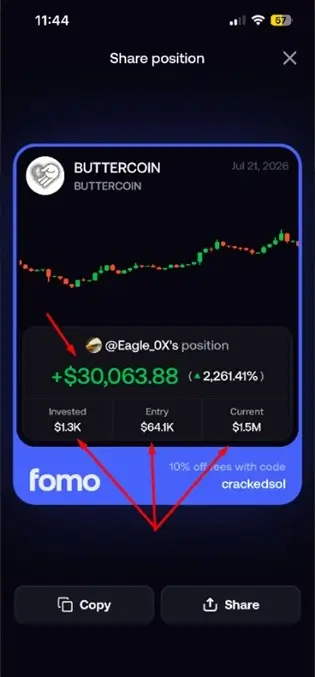
We have a profit calculator that shows you the potential amount you can make per time trading memecoins. It allows you to enter the liquidity, market caps, entries, slippage, and amount.
How to Buy and Sell Crypto on Fomo App (Beginners Guide)
Common Deposit Problems (and How to Fix Them)
Crypto deposits are generally straightforward.
However, beginners occasionally run into issues that can delay or even prevent their funds from arriving.
Fortunately, most of these problems are avoidable. Let’s look at the most common ones.
1. Sending Cryptocurrency Through the Wrong Network
This is the number one mistake new crypto users make.
Suppose you’re sending SOL. Your receiving wallet expects the Solana Network.
Instead, you accidentally choose Ethereum. The transaction completes successfully…
…but the funds never arrive.
The problem isn’t the FOMO trading app. The problem is that the cryptocurrency was sent across an entirely different blockchain.
In many cases, those funds cannot be recovered.
How to avoid it
Before confirming any withdrawal:
✔ Compare the blockchain shown inside FOMO.
✔ Compare the blockchain selected on the sending wallet.
They must match exactly.
Never assume.
Always verify.
2. Copying the Wrong Wallet Address
Wallet addresses are long strings of letters and numbers. Typing them manually is asking for trouble.
Instead:
Always use the Copy Address button inside the FOMO app.
After pasting it into the sending wallet, compare:
- The first six characters.
- The last six characters.
If both match, you’re good to go.
It takes only five seconds and could save your entire investment.
Hack: If you manage your crypto wallet on another phone, just use the other phone and scan the QR code to avoid any mistakes.
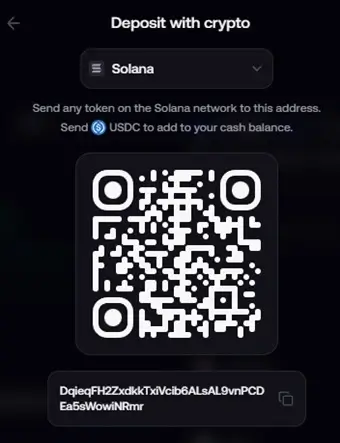
When scanned, confirm the beginning and end of the wallet address. If it correlates, proceed to transact.
As always, be careful and do not rush.
3. Sending an Unsupported Token
Not every cryptocurrency is supported for every deposit route.
For example, your wallet may support SOL and USDC, but not a newly launched meme token on another blockchain.
Before sending any asset: Confirm that FOMO supports that token and the blockchain it runs on.
If you’re unsure, start with a small test transaction before transferring your full balance.
4. Assuming “Pending” Means Something Is Wrong
Do not panic if you see a transaction marked Pending.
In reality, this usually means the blockchain is still confirming your transaction.
Remember: every crypto transaction must be validated by the network before it becomes available in your wallet.
During periods of heavy congestion, confirmations can take longer than usual. This is perfectly normal.
If you have the transaction hash (TXID), you can track its progress on the blockchain explorer.
5. Buying Crypto Without Checking the Final Price
When using debit cards or Apple Pay, the payment provider displays the final amount before completing your purchase.
Always review:
- Exchange rate
- Processing fee
- Network fee (if applicable)
- Final amount you’ll receive
Never rush through this page.
It’s your last opportunity to review the transaction.
6. Ignoring Wallet Security
Funding your wallet is only half the job.
Protecting it is equally important.
Remember:
Your FOMO wallet is self-custodial.
That means you-not FOMO-control the private keys.
If someone gains access to your wallet or your recovery phrase, they can transfer your assets, and those transactions usually cannot be reversed.
That’s why, immediately after creating your account, you should export your private key and store it securely offline. Never save it in cloud storage, email drafts, messaging apps, or screenshots on your phone.
A handwritten copy stored in a safe location is generally the safest option. This mirrors the security advice in your How to Use FOMO App guide.
Best Practices Before Your First Deposit
Before funding your wallet for the first time, develop a few simple habits that experienced traders follow.
- Make a small test deposit before transferring a large amount.
- Verify both the wallet address and blockchain network.
- Keep enough cryptocurrency to cover network fees.
- Avoid making deposits over public Wi-Fi.
- Enable every available security feature on your device.
- Save your private key securely before holding significant funds.
- Never send funds to wallet addresses shared through unofficial Telegram groups, Discord messages, or social media comments.
These habits take only a few minutes but can save you from costly mistakes later.
Read Also – 📌 How to Make Money on Fomo

2 Comments