
How to Withdraw from FOMO Crypto App: Complete Guide

If you’ve made a profit on the FOMO trading platform or simply want to move your crypto somewhere else, you’ll eventually need to know how to withdraw from the FOMO crypto app.
The good news is that the process isn’t complicated.
The important thing to understand is that withdrawing from FOMO is a little different from withdrawing from a traditional crypto exchange.
FOMO crypto app is built around a self-custodial wallet. Your crypto isn’t sitting in a company-controlled account waiting for the FOMO team to approve your withdrawal.
Instead, your assets are held in your wallet, and you control the private keys.
That gives you more control over your crypto, but it also means you need to be careful when sending it out.
If you enter the wrong wallet address or select the wrong blockchain network, there may be no way to reverse the transaction.
So, before you hit that final confirmation button, take a few seconds to check everything.
In this guide, I’ll walk you through how to withdraw money from Fomo, how to send your crypto to another wallet, what you need to know about cashing out to a bank or card, how long withdrawals take, what fees to expect, and what to do if your withdrawal shows as pending.
Why FOMO Withdrawals Work Differently
If you’ve used a centralized exchange before, you’re probably familiar with the usual process.
You hold your cryptocurrency on the exchange, click Withdraw, enter your destination, and the exchange processes the transaction.
FOMO crypto works differently because it is self-custodial.
Your tokens live in a wallet controlled by your private keys rather than being held by FOMO in the same way a centralized exchange holds customer balances.
That distinction matters when you’re withdrawing.
With an on-chain crypto withdrawal, you’re essentially telling your wallet:
“Send this amount of crypto from my wallet to this other address.”
Once the transaction is confirmed on the blockchain, it normally cannot be reversed.
That’s why I always recommend treating the final confirmation screen seriously.
You don’t need to be nervous about it. Just check the details before you approve the transaction.
What Can You Withdraw from FOMO Trading App?
There are essentially two different things you might mean when you say you want to withdraw from FOMO.
The first is sending your cryptocurrency to another wallet.
For example, you might want to move SOL from FOMO to Phantom, another wallet you control, or a cryptocurrency exchange.
The second is cashing out your crypto into traditional money, such as a bank account or debit card.
Those are two different processes.
A crypto-to-crypto withdrawal happens on the blockchain.
A crypto-to-fiat withdrawal involves an on/off-ramp or payment partner and depends heavily on your country and the payment methods available there.
Your source material specifically notes that fiat cash-out availability varies by country and that the described bank/card cash-out rail is primarily available in the US.
So don’t assume that seeing a cash-out option in one country means you’ll see exactly the same option where you live.
Money Withdrawal Methods on FOMO Crypto App
Once you have money available in your FOMO account from successful trades, you have several ways to withdraw it. FOMO currently supports three main withdrawal methods, although the options available to you may depend on your location and account eligibility.
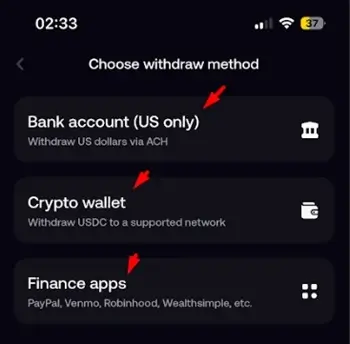
1. Bank Account – U.S. Only
If you are based in the United States, the FOMO app can allow you to withdraw your money directly to a U.S. bank account.
This is the simplest option if you want to move your FOMO balance into traditional cash that you can keep in your bank account and use normally.
Important: The bank withdrawal option is currently limited to eligible U.S. users.
2. Crypto – Withdraw as USDC
Another option is to withdraw your money as USDC (USD Coin).
USDC is a cryptocurrency designed to track the value of the U.S. dollar, so 1 USDC is generally intended to be worth about $1. Instead of sending the money to a bank, FOMO sends the USDC to a compatible crypto wallet using a supported blockchain network.
Be careful when selecting the network. Your receiving wallet must support the same network FOMO uses for the withdrawal. Sending crypto through an unsupported network can result in lost funds.
Fomo app uses the Solana network, so you want to use a USDC wallet address on the Solana network.
3. Finance Apps
FOMO also supports withdrawals through certain financial and payment apps, including services such as PayPal, Venmo, Robinhood, and Wealthsimple, depending on availability.
Instead of sending your money directly to a traditional bank account, you can transfer it to one of these supported financial platforms and manage the funds there.
This can be convenient if you already use one of these services for payments, investing, or managing your money.
Which Withdrawal Method Should You Use?
The best option depends largely on where you live and what you want to do with your money.
- U.S. bank account: Best if you want traditional cash in your bank.
- USDC: Best if you want to move the funds into a crypto wallet or exchange.
- Finance apps: Convenient if you already use PayPal, Venmo, Robinhood, Wealthsimple, or another supported service.
Overall, FOMO’s withdrawal system offers users several ways to withdraw their funds from the platform, rather than locking them into a single method.
In our guide, we will break down how to withdraw money from Fomo on the Solana network.
How to Withdraw Crypto from FOMO App to Another Wallet’
If you want to move your crypto out of FOMO and into another wallet, this is the straightforward route.
Before you start, have the receiving wallet address ready.
For example, if you’re sending SOL to another Solana wallet, you’ll need the Solana wallet address of the destination.
Don’t type the address manually. Copy it from the receiving wallet instead.
Step 1: Click Withdraw on Fomo
If you are using a desktop, click on “withdraw”.
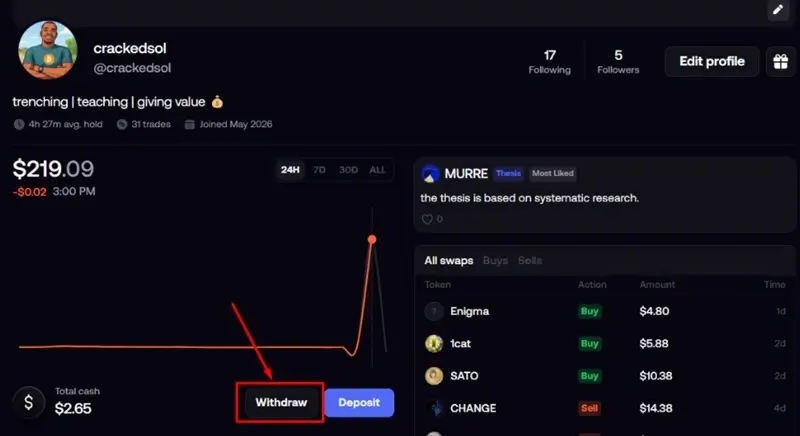
But if you are on mobile, click on the “negative knob” on your profile to withdraw.
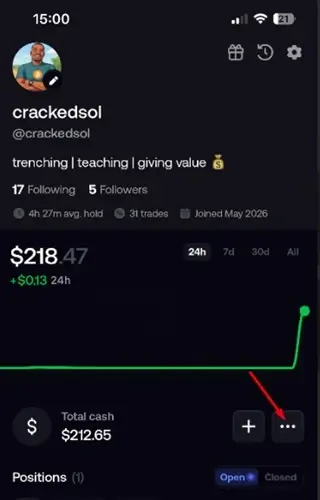
- Click on withdraw.
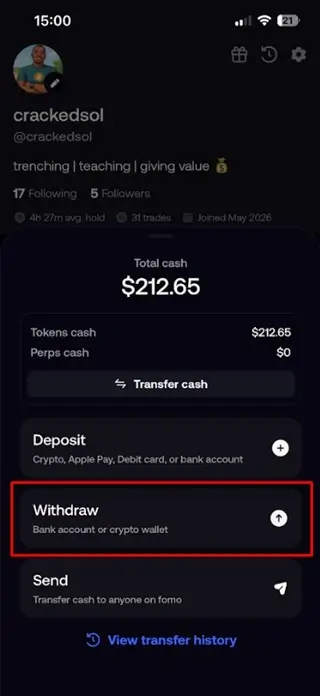
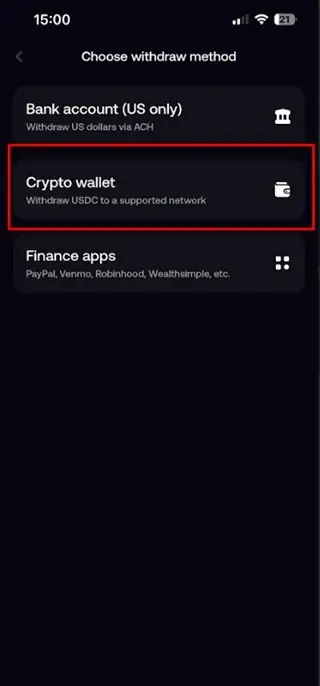
Step 2: Choose the Withdrawal Option
We are using the crypto method, so hit ‘Crypto wallet’.
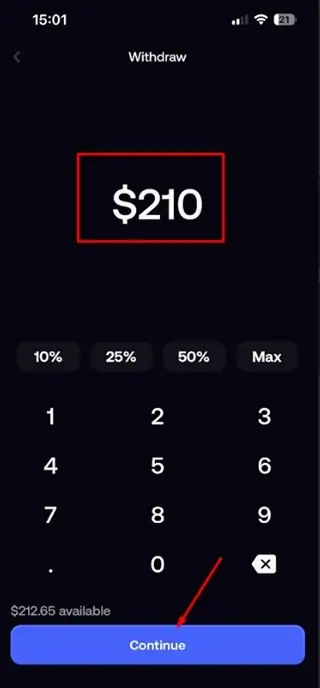
Step 3. Enter withdrawal amount
Enter the preferred withdrawal amount and click on “Continue” at the bottom.
Step 4. Enter Wallet Address
As already stated, the Fomo app allows USDC withdrawals on the Solana blockchain.
For emphasis:
I am withdrawing – USDC
Network – Solana.
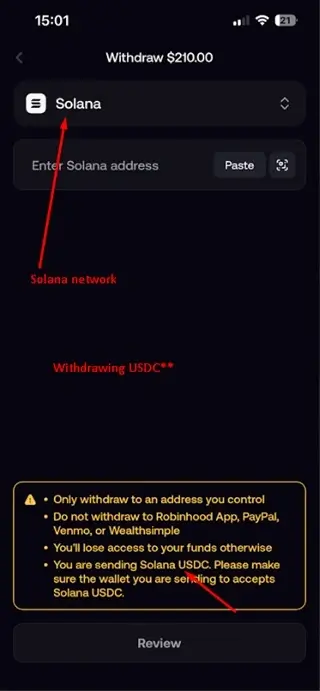
Now, we need to copy our USDC wallet address on the Solana network and paste it here.
You can withdraw into any external wallet like Phantom, Coinbase, Binance, etc. But I will be using Gate.io for our example – just as we did when we deposited USDC on the Fomo app.
You can sign up on Gate.io here, or sign in here [if you already have an account].
- Go to Deposit
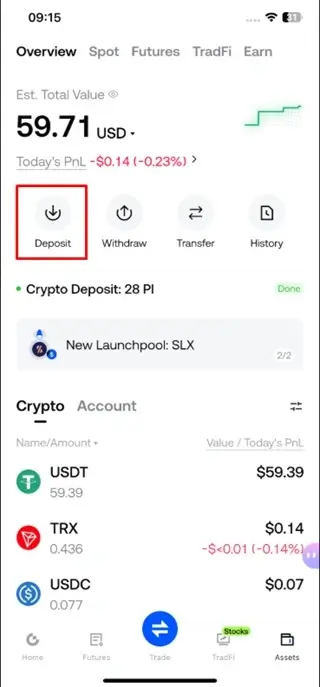
- Select On-Chain Deposit.
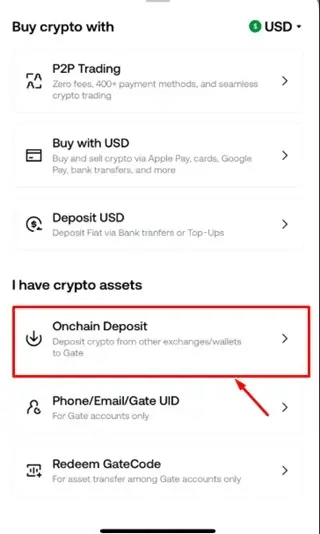
- Choose USDC as the asset.
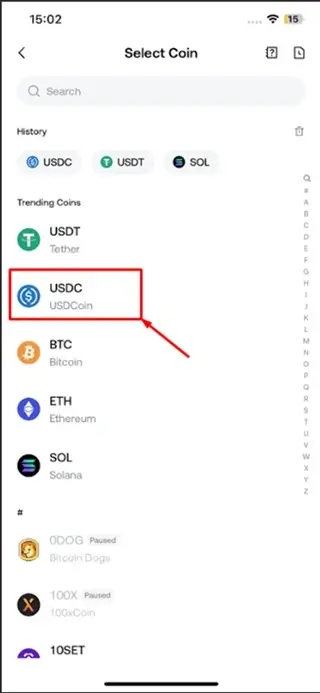
- Select the Solana (SOL) network.
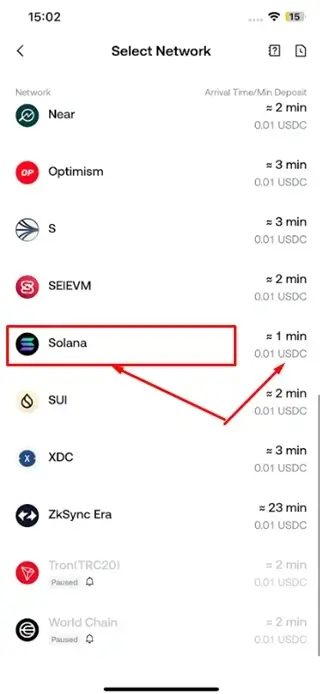
- Gate will generate a deposit address. So, copy it out.
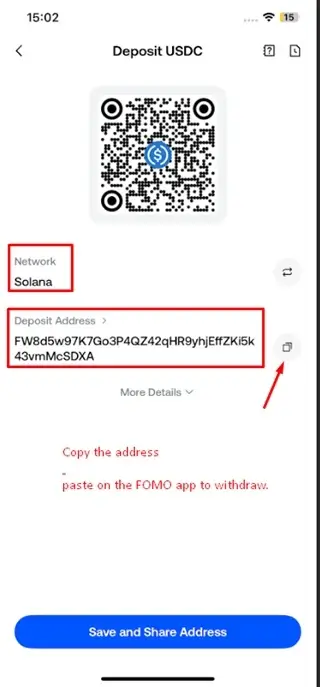
Next, I’ll return to the Fomo app, paste that deposit address into the withdrawal field, enter the amount of USDC I want to send, and review all the details carefully.
Step 5. Confirm withdrawal from the Fomo app
Paste the wallet details from Gate.io into the Fomo app and confirm the transaction.
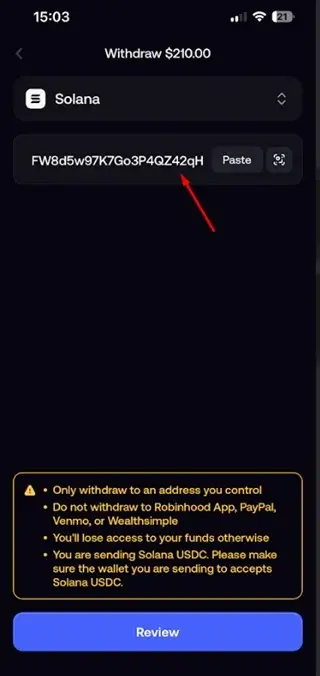
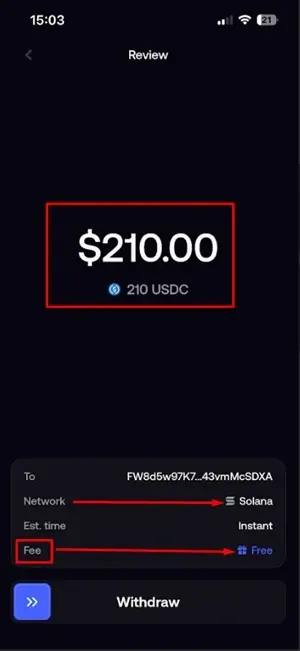
- Review the transaction.
- Transaction done.
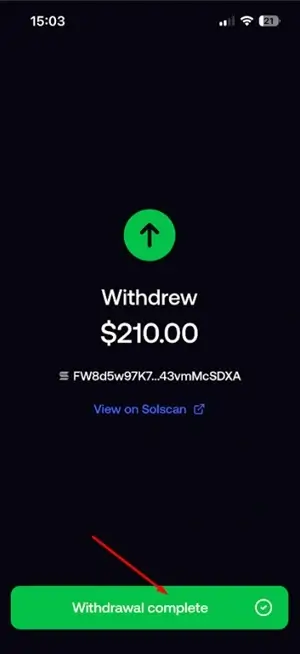
Step 6. Receive money in your Crypto wallet balance
Final Step: confirm your funds have arrived and have been successfully transferred to the destination wallet. See our withdrawals made below.
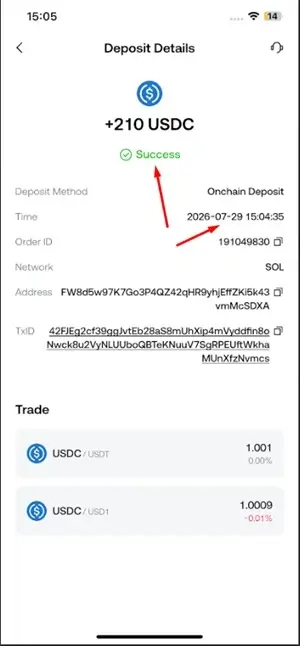
Open your exchange account and confirm that the USDC has been credited to your wallet balance. If the funds haven’t appeared yet, check the transaction status on the blockchain explorer using the transaction ID (TXID) and allow a few more minutes for the network to process the transfer.
That is all about the A-Z steps of withdrawing money from the Fomo trading App 🔥
FOMO Crypto App Review: Legit & Worth It? (2026)
Alternative Method to Withdraw from the Fomo App
You can use bank or finance apps if they are available in your country. For the bank withdrawal process.
This method needs a little more explanation because crypto-to-bank withdrawal is not the same as sending crypto to another wallet.
You cannot normally send SOL, USDC, or a memecoin directly into a normal bank account.
The cryptocurrency first has to be converted into fiat currency through a supported cash-out or on/off-ramp service.
The basic process, whether you are using Fomo or its alternatives, is: Crypto → Cash-out partner → Bank/card
How to Withdraw from FOMO to a Bank Account
If you’re trying to cash out to your bank, here’s what to do.
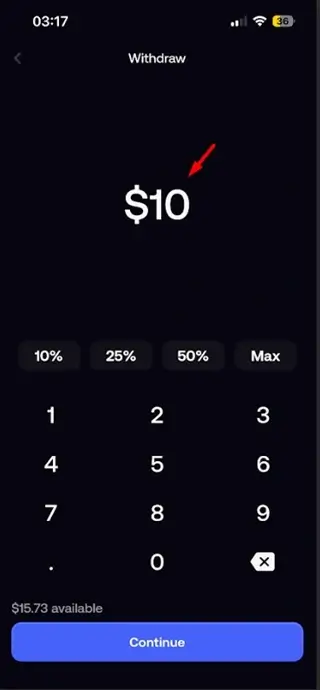
Step 1: Select Bank and Enter amount
Select the bank method.
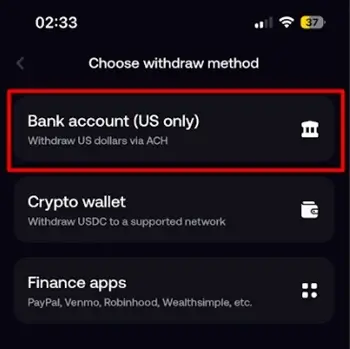
- Enter the amount you wish to withdraw.
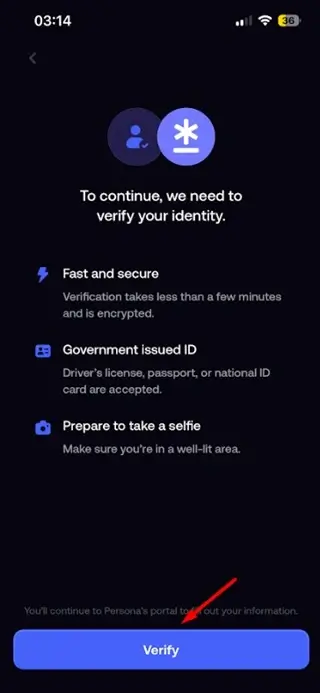
Step 2. Confirm Your Identity
To continue with this method, you’ll need to complete a quick verification process, which should only take a few minutes. Have your government-issued ID ready and be prepared to take a selfie.
Step 3: Choose Your Payout Method
Depending on your location, you may see options such as:
- Bank account
- Debit card
- Supported on/off-ramp partner
Step 4: Review the Amount and Fees
Before approving the cash-out, check how much you’re sending and how much you’ll actually receive.
Look for any displayed service or processing fee.
Step 5: Confirm the Cash-Out
Once you’ve reviewed everything, confirm the transaction.
The crypto portion of the process may happen quickly, while the bank or payment provider can take longer to complete the fiat transfer.
How Long Does a FOMO Withdrawal Take?
The answer depends on which type of withdrawal you’re making.
1. Crypto-to-Crypto Withdrawal
In our example, we initiated the withdrawal from the FOMO app at 15:03, and the funds arrived at 15:05.
That means the withdrawal was completed in approximately 2 minutes.
While this was our experience, withdrawal times can vary depending on the withdrawal method, network conditions, and other factors.
2. Crypto-to-Fiat Withdrawal
Cash-outs to a bank account or card take 1-2 or 3 working days if weekends.
So, if your crypto withdrawal is confirmed on-chain but your bank hasn’t credited the money yet, the delay may be on the fiat-processing side rather than the blockchain.
Are FOMO Withdrawals Free?
Yes, the FOMO withdrawals are free – unlike buying and selling. You get what you withdraw.
What Do You Do if Your Withdrawal Shows “Pending”?
Don’t panic if your transaction shows “Pending.”
A pending status doesn’t automatically mean your money is lost or that the withdrawal has failed.
For an on-chain withdrawal, the transaction may simply be waiting for confirmation from the blockchain.
Your source specifically notes that an on-chain transaction can remain pending until the network confirms it, and that this is not the same thing as a failed transaction.
Give it some time.
If it remains unusually long, check the transaction status if a transaction hash or blockchain explorer link is available.
And most importantly, don’t submit the same withdrawal repeatedly just because the first one is still pending.
However, the good news is that if you follow the steps, you’ll get the same results. Withdrawals can be completed in as little as 2 minutes using crypto.
Common FOMO Withdrawal Mistakes to Avoid
You don’t need to make withdrawals complicated. Most problems come from a few simple mistakes.
1. Sending to the Wrong Wallet
Always copy the receiving address directly from the destination wallet.
Don’t type it manually.
Then check it again before confirming.
Preferably, I like the QR code scan option if your wallet is on another mobile device. That saves you from the stress of copying and pasting the address.
2. Using the Wrong Network
If you’re sending USDC, make sure the destination supports USDC on the Solana network.
The same rule applies to every other cryptocurrency and blockchain.
Your source specifically warns that sending through a mismatched network can permanently result in lost funds.
3. Using a Random “Withdrawal Agent”
Be careful if someone contacts you promising to “speed up” your FOMO withdrawal.
You don’t need a stranger on Telegram, WhatsApp, X, or another social platform to process a normal wallet withdrawal.
Your source specifically warns against third-party services or agents promising faster withdrawals.
Also – Get access to Solana Meme Coin Profit Calculator to easily calculate PNL with Liquidity.
How to Keep Your FOMO Withdrawal Safe
Here’s the habit I recommend every time you withdraw:
Slow down at the confirmation screen. Crypto moves quickly, but there’s no prize for being careless.
🔎 Check the destination address.
‼️ Check the network.
🛡️ Check the amount.
🕵🏻 Check the fee.
🎯 Then confirm.
And there’s one more thing you should never forget.
Your FOMO crypto wallet is self-custodial, so your private key is extremely important.
Meaning, if someone gets your private key, they can potentially access your wallet and move your assets.
Your source recommends exporting the private key and storing it offline rather than sharing or keeping it casually on your device.
Never give your private key or recovery information to someone claiming to be FOMO support.
You don’t need to share it to complete a legitimate withdrawal.
FOMO App Referral Code (2026): Free Bonus & Sign-Up Guide
How to Check Your FOMO Withdrawal History
If you want to see previous deposits, purchases, sales, and withdrawals, your source indicates that you can access your trading history through your profile.
Go to your profile, select the recycle/history icon, and review your transaction history.
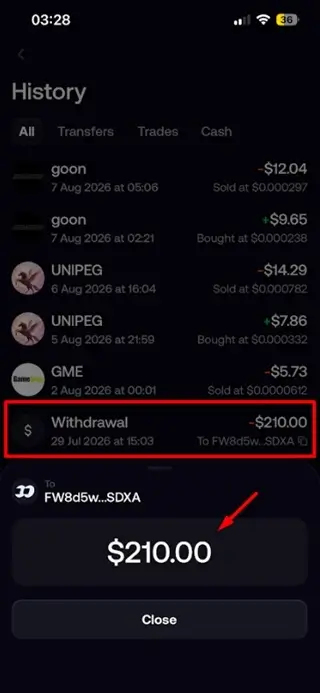
This is useful when you want to confirm whether a withdrawal was submitted or check an older transaction.
Is There a Minimum Withdrawal Amount on FOMO?
No, there is no strict platform-wide minimum withdrawal amount.
Can FOMO Freeze Your Withdrawal?
Because FOMO is self-custodial, it doesn’t directly control your private keys or the funds in your wallet in the same way a centralized exchange controls customer balance.
That limits its ability to freeze a normal wallet-level crypto transfer. The most they can do is suspend your account – if you break their terms. They will still allow you to withdraw your money.
However, features involving fiat cash-outs can still depend on the app functioning properly and on the payment partner and regional availability.
In other words, don’t confuse a blockchain withdrawal with a bank cash-out.
They involve different systems.