
How to Delete FOMO App Account Safely: Full Guide

FOMO App is becoming a popular name among memecoin trading platforms. However, its social-style design, trading experience, fees, or other features may not appeal to everyone.
As a result, some Degen’s may eventually decide to remove or delete their Fomo App account.
So, if you’ve decided that you no longer want to use the Fomo crypto trading app, deleting your account is straightforward.
The good thing is that you don’t need to contact support first just to find out how to remove your account. The account deletion option is available inside the FOMO App.
I’ll walk you through each step below, along with a few things you should check before deleting your account.
Can You Delete Your FOMO Crypto Trading App Account on Web/Desktop?
No. You currently cannot delete your FOMO App account from the web or desktop version. To delete your account, you need to use the FOMO mobile app on Android or iOS.
What To Know and Do Before You Delete Your Fomo App
Please note: Deleting your FOMO App account is irreversible, meaning your account and associated data on the platform will be permanently deleted.
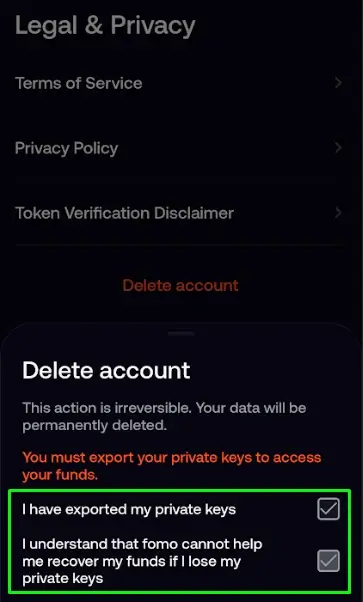
Before deleting your account, make sure you export your private keys if you still have funds or assets in your wallet. This ensures you can access your assets after the account is deleted.
However, I recommend withdrawing your funds from the FOMO App to an alternative platform [5 different types] before deleting your account. This is generally the safer option if you no longer plan to use the platform.
What Actually Gets Deleted
- Your account profile, login credentials, and in-app personal information tied to your FOMO account
- Your trade history and social activity within the app (following, leaderboard presence, etc.), once processed
How to Delete Your FOMO App Account
You can delete your FOMO account directly from the mobile app.
Quick steps
- Log in to the FOMO App
- Go to Settings
- Select Legal and Privacy
- Tap Delete Account
- Follow the confirmation prompts to complete the deletion
That’s it.
Now let’s go through the process in more detail.
Step 1: Log In to Your FOMO Account
Open the FOMO App and log in to the account you want to delete.
You need to be logged in to the account before you can access the account management options.
FOMO currently supports account access through its app and web platform, but the deletion steps you provided are specific to the mobile app.
If you’re already logged in, you can move directly to Settings.
Step 2: Go to Settings
Once you’re inside the FOMO App, open Settings.
This is where you’ll find the options for managing your account and other app preferences.
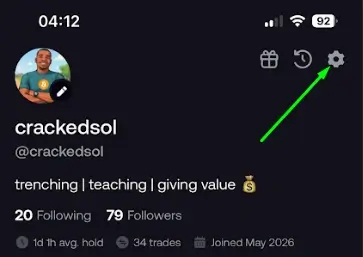
Look at the top right and click on the Settings option within the app and open it.
Step 3: Go to Legal and Privacy
Inside Settings, find: Legal & Privacy.
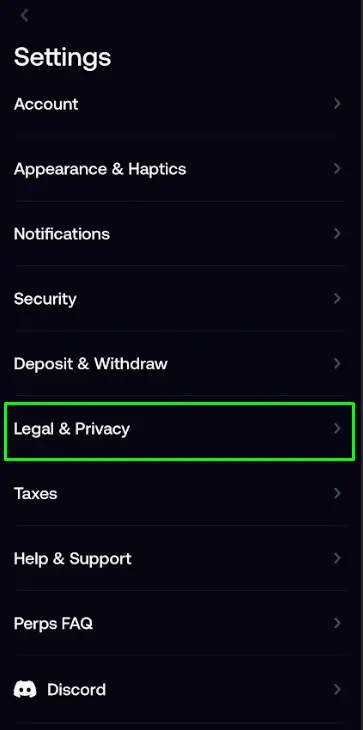
Tap it to continue.
This section contains FOMO’s legal and privacy-related information and account options.
You can go through it if you want, or we can focus on our mission “deleting the account”.
Step 4: Tap Delete Account
Inside Legal and Privacy, look down, and you will see “Delete Account”; tap on it.
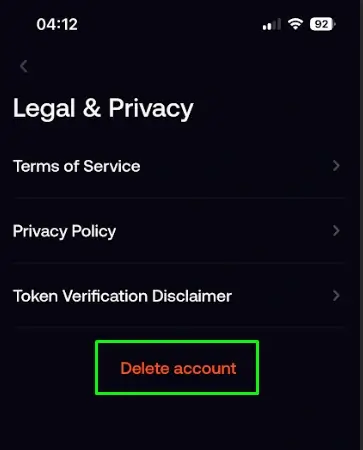
Step 5: Slide the Toggle to Delete Account
Once you select the account deletion option, FOMO App will display a disclaimer reminding you that the action is irreversible. Read the warning carefully and follow the required confirmation steps.
If you’re certain you want to delete your account, check both confirmation boxes:
- “I have exported my private keys.”
- “I understand that FOMO cannot help me recover my funds if I lose my private keys.”
After confirming that you understand the risks and have secured your private keys, slide the toggle to delete your account and complete the final confirmation.
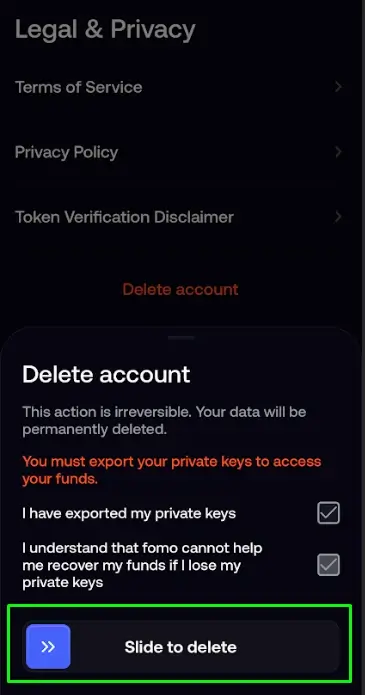
That is all – on how to remove or delete a FOMO trading app account.
What Happens When You Delete Your FOMO Account?
Deleting an account is different from simply deleting the FOMO App from your phone.
If you only uninstall the app, your account may still exist.
That’s why you should use the Delete Account option inside FOMO if your goal is to actually remove the account.
FOMO’s Privacy Policy states that users may request deletion of their personal information, although certain exceptions can apply, including legal obligations and other circumstances specified in the policy. You can check that out if you want to go legal.
But for operational purposes, your account is deleted, and that’s all that matters.
What Should You Do Before Deleting Your FOMO Account?
Like I already stated, before you press Delete Account, I’d recommend checking a few things first.
1. Withdraw Any Remaining Funds
If you still have money or crypto in your FOMO account, deal with that before deleting your account.
2. Check Your Open Positions
If you’re actively trading, check whether you have any open positions or ongoing transactions.
Don’t delete your account in the middle of a transaction and assume everything will automatically resolve the way you expect.
Take care of anything you still need to manage first.
3. Save Anything You Need
If there is transaction information, account information, or other records you may need later, save what you need before deleting your account – mostly your private key.
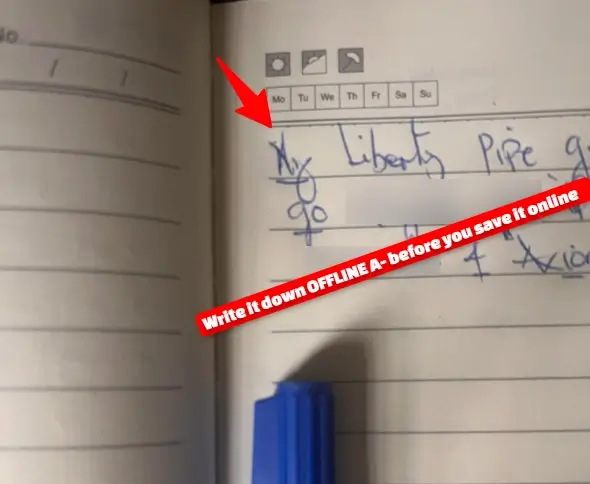
This is particularly useful if you keep records of your cryptocurrency transactions for accounting or tax purposes.
Once you’ve deleted an account, you shouldn’t assume you’ll always be able to access the same account information later.
4. Make Sure You Actually Want to Delete It
If you’re simply taking a break from the Fomo app, you may not necessarily need to delete your account.
Deleting an account is a more permanent decision than simply uninstalling the app.
If you’re unsure, you can first stop using the app and decide later whether you actually want to proceed with deletion.
But if you’re certain you don’t want the account anymore, use the Delete Account option.
Delete/Uninstall FOMO App vs Delete Your FOMO Account
These are two different things.
· Deleting the app
You remove the FOMO application from your phone.
Your account may still exist.
· Deleting your account
You use the account deletion option inside FOMO to request deletion of the account.
In simple terms: Uninstall app ≠ Delete account
If you want to completely stop using your FOMO account, don’t just uninstall the app.
Go through: Settings → Legal and Privacy → Delete Account
But if you want to uninstall, click the app and highlight → click on uninstall.
Can You Delete Your FOMO Account Without Contacting Support?
Yes, you can initiate the deletion directly inside the FOMO App: Settings → Legal and Privacy → Delete Account
So, you shouldn’t need to email support simply to find the account deletion option.
Can FOMO Delete My Personal Information?
FOMO’s Privacy Policy says users can request deletion of their personal information, subject to certain exceptions provided by law.
The policy explains that some information may need to be retained where required by law or for other permitted purposes.
So, there is an important distinction between requesting deletion of your personal information and guaranteeing that absolutely every piece of data disappears immediately from every system.
The latter isn’t something you should assume.
What If I Change My Mind?
Before confirming account deletion, make sure you’re comfortable with your decision.
If you simply want to stop using FOMO for a while, deleting your account may be unnecessary.
But if you’ve already submitted a deletion request and want to reverse it, don’t assume the account can automatically be restored.
If you’re unsure about the status of your deletion, contact FOMO support at support@fomo.family or set up a new account.
63 Memecoin Trading Terms in English: Beginner’s Glossary
Should You Delete the FOMO App After Deleting Your Account?
Yes, if you’re completely finished with FOMO.
Once you’ve successfully completed the account deletion process, you can uninstall the FOMO App from your phone.
The important part is that uninstalling the app isn’t a substitute for deleting the account.
How to Delete FOMO App Account on iPhone: Quick Checklist
Before deleting your account, run through this checklist:
- Log in to FOMO
- Close all trading calls.
- Open Settings
- Open Legal and Privacy
- Select Delete Account
- Check your FOMO balance
- Withdraw any funds you still need
- Check for active/open positions
- Save any transaction records you may need
- Confirm the account deletion
- Uninstall the FOMO App afterward
This takes only a few minutes, but checking your balance and records beforehand can save you a headache later.