How to Close a Trade on FOMO App: Step-by-Step Guide

Trading memecoins or blue-chip cryptocurrencies when you have a diamond hand is sweet. And if you’ve bought a crypto or memecoin on the Fomo crypto app, and now you’re wondering how to close the trade, the process is pretty straightforward.
Closing a trade simply means selling the position you currently hold.
And two tinges are involved. You might want to close because you’ve reached your profit PNL target, want to cut a loss, need to take your initial investment out by using the 50/30/20 formula, or simply don’t want to hold the token anymore.
They are all in one the same process.
And the good thing is that the FOMO app is designed to let you trade from both mobile and web, so you can open a trade on your phone and close it from your desktop/web app if that’s more convenient.
When is the Best Time to Close a Position on the Fomo Trading App
Knowing when to enter a memecoin trade is only half the battle. Knowing when to exit can save you from becoming the bagholder or exit liquidity.
Here are some situations where I’d seriously consider getting out.
1. When Your Narrative Is Dead
You should always know why you entered a trade in the first place.
If you bought because of a particular narrative, keep checking whether that narrative is still alive.
If the attention disappears, the community goes quiet, engagement dries up, and the original reason for the trade no longer holds, there may be little reason to keep holding simply because you’re hoping for a comeback.
At that point, I’d rather take the loss and move on than become a permanent bagholder.
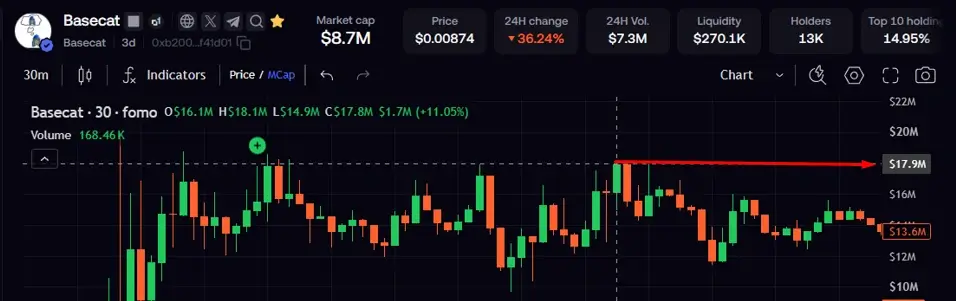
Sometimes, the best trade is simply getting out. But if you have a strong narrative, Hold – like the trade I am currently holding.
2. When the Top 10 Wallets Start Accumulating Heavily
Another thing I watch is the concentration of holdings among the top 10 wallets.
If you notice that a small number of wallets suddenly control a significantly larger percentage of the supply, that can change the risk profile of the trade.
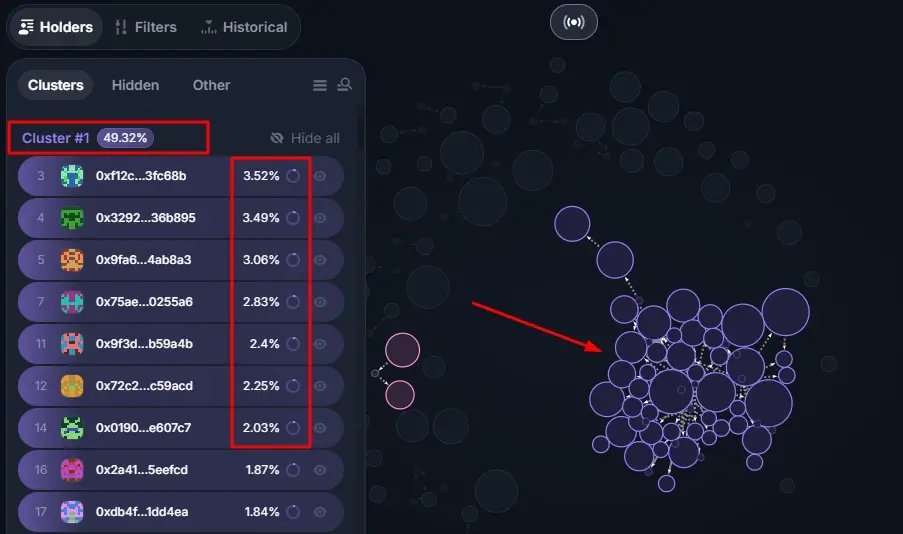
It doesn’t automatically mean a rug pull is coming. There could be legitimate reasons for the concentration.
But if the increase looks unusual and you’re no longer comfortable with the wallet distribution, it’s worth reassessing the position.
If the wallet data makes you uncomfortable, don’t ignore it.
3. When the Trade Looks Manipulated
Memecoin markets can be heavily manipulated.
You can sometimes see tokens showing impressive volume, liquidity or market-cap numbers despite very little transaction activity or community interest.
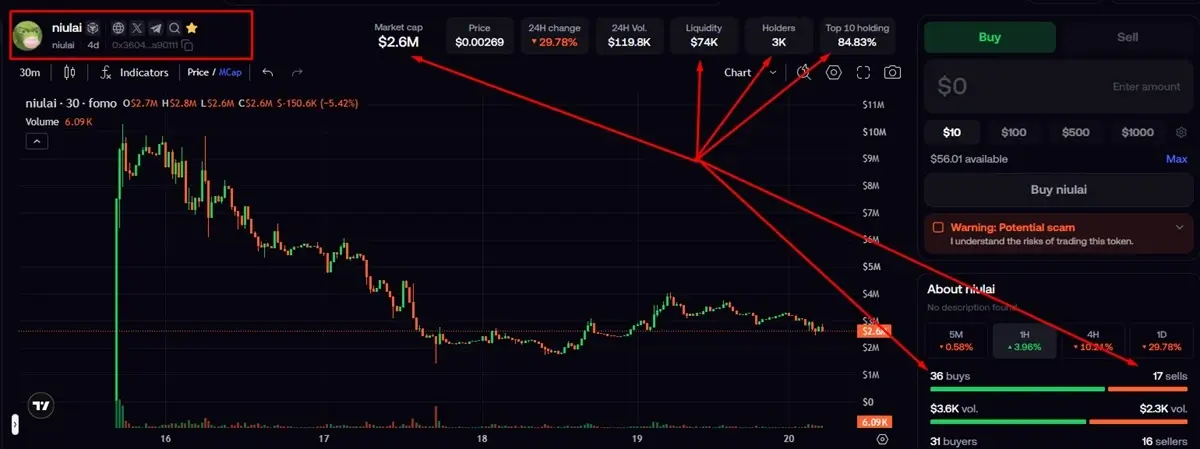
For example, I came across the one above and added it to my watchlist instead of immediately aping in.
I wanted to see what would happen because the chart and trade were all fake.
There are always more reasons to close a trade, you can discover more in Rektocracy – [a Free Memecoins trading course]
Requirements to Close a Trade on Fomo Crypto Trading App
1. A FOMO App Account
To make money through the FOMO App, you’ll have created an account on the platform. The good news is that creating an account takes about a minute.
If you haven’t created one yet, follow our step-by-step guide to get started.
2. Funded Account
If you choose one of the investment or trading routes, you’ll need to deposit funds into your FOMO App account before you can get started.
We’ve already covered the deposit process in detail, including the different ways you can fund your account.
Once your account is set up and funded, you can move on to the different ways of potentially earning through the FOMO ecosystem.
3. An Opened Trade
You must have opened a trade on the platform before you can close it, right? Yeah.
Before closing a Trade on the Fomo app
Kindly note that once the transaction is completed, the amount you sold will no longer be part of your token position. And the important thing is to make sure you’re selling the correct token and the correct amount before confirming.
How to Close a Trade on FOMO App
Let’s do it together with real-time screenshots.
Step 1: Open the FOMO App
Both mobile and web app allow you to view your portfolio and activity. Open the FOMO App and log into your account.
If you’ve already deposited funds and bought a token, your holdings will be reflected in your portfolio.
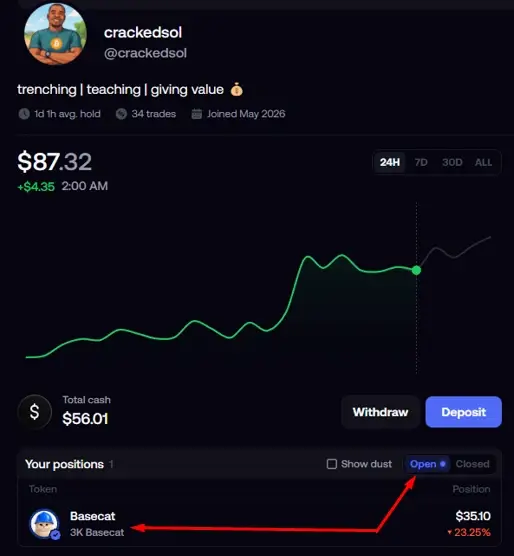
Step 2: Find the Trade You Want to Close
Go to your portfolio and find the cryptocurrency or memecoin you want to sell [should you have many of them].
Tap the asset to open its position.
You’ll want to confirm that you’ve selected the right token before proceeding.
This is especially important if you’re holding several similar-looking tokens.
Step 3: Tap Sell
Once you’ve opened the token or position, select Sell.
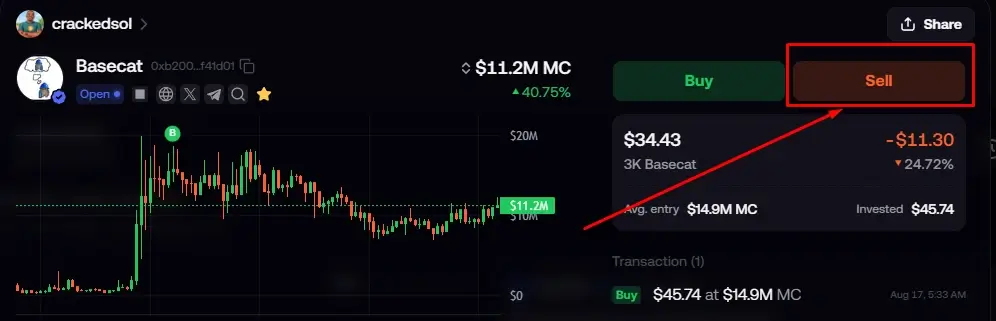
This is the action that closes your spot position.
If you want to exit the entire position, you’ll sell the full amount you hold.
And if you only want to take some profit, you can sell part of the position and leave the rest invested.
Step 4: Choose How Much You Want to Sell
You don’t always have to sell everything.
You can decide to:
- Sell your entire position
- Sell part of your position
- Take out your initial investment
- Lock in some profit while keeping some exposure
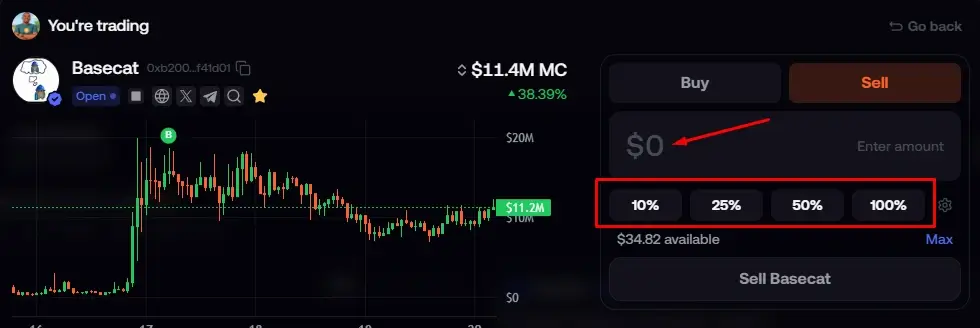
You are free to also select in percentage as well.
Step 5: Review the Sale
Before confirming, take a moment to check the transaction details.
Make sure:
- You’re selling the correct token.
- The amount is correct.
- You’re comfortable with the expected proceeds.
- You understand the applicable trading fee.
- You’re happy with the current market price.
This is particularly important when you’re trading volatile memecoins because the action is irreversible.
And kindly note that you might get slightly different amounts because a token can move significantly between the time you decide to sell and the time the transaction executes.
Step 6: Confirm the Sale
Once everything looks correct, confirm the transaction. Click on Sell
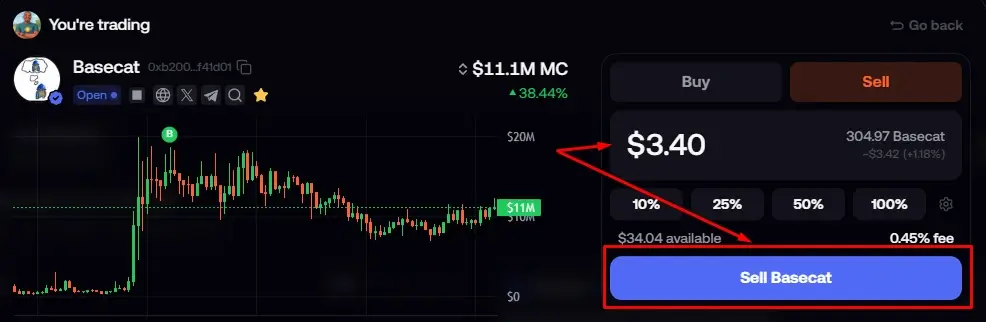
After the sale executes, your position will be reduced by the amount you sold.
If you sold the entire position, you have effectively closed the trade.
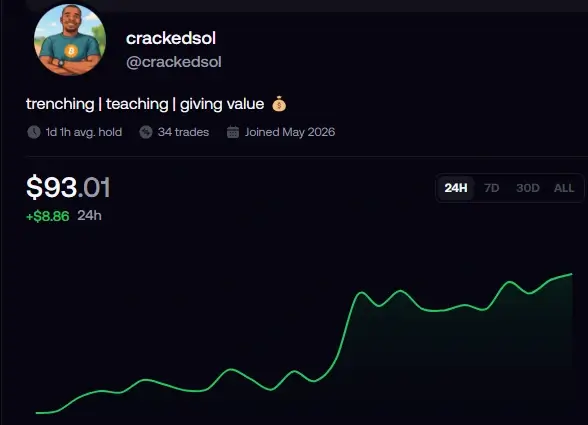
You can then check your portfolio to confirm that the position has been removed or reduced accordingly, and the cash added to your balance.
How to Close a Trade Without Selling Everything
You don’t have to completely exit a position every time. Sometimes taking a partial profit makes more sense.
Let’s say you bought: $100 and your position grows to: $500. Instead of selling everything, you could sell a portion.
For example: Sell $200 → keep $300 invested
This allows you to lock in some gains while still maintaining exposure if the token continues moving upward.
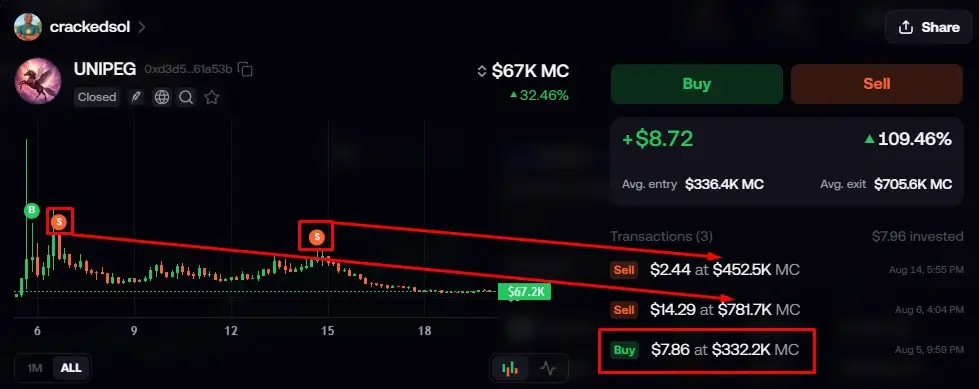
This is what I did when I traded UniPeg
I first sold to take initial profits – although it was 100% out of 130% and then kept the balance to ride on – which I later sold off for profits too.
What is Fomo App Position Closing Trading Fees?
FOMO charges 0.5% on all trades, or 0.45% if you signed up using a referral link or code. The fee is also reduced significantly for trades of $200 or more.
Should You Sell Everything or Take Partial Profits?
There isn’t one answer that works for every trade.
Sell everything when:
- Your target has been reached.
- Your trade thesis is invalidated.
- You no longer want exposure to the token.
- You need the capital for another opportunity.
Take partial profits when:
- You still believe the token has room to run.
- You’ve already made a significant gain.
- You want to reduce your risk while keeping some exposure.
- You want to recover your initial capital.
What Is Slippage When Closing a Trade?
Slippage is the difference between the price you expect and the price at which your transaction actually executes.
For example, you might see that your token is trading around: $0.010
You decide to sell a large position. But because there isn’t enough liquidity at that exact price, part of your order may execute at lower prices.
Your final proceeds could therefore be lower than the amount you expected.
This matters particularly with low-liquidity memecoins.
If you’re closing a large position, consider the size of your trade relative to the available liquidity.
Can You Close a FOMO Trade from Desktop?
Yes. You can open a trade on your phone and close it on your desktop. In fact, in our guide, I bought the $BaseCat token on mobile and closed on Desktop to show us.
This is useful if you entered a trade while away from your computer and later want to manage it from a larger screen.
Meaning, you don’t necessarily have to close the position on the same device you used to open it.
How to Withdraw your Closed Position on Fomo App
Once your sale has executed, the token position you sold is reduced.
If you sold your entire holding, you no longer have that spot position.
Your proceeds become part of your available balance, subject to the applicable transaction and settlement mechanics.
If you’re finished trading and want to move the money out of FOMO, the next step is to withdraw your funds.
See our guide: How to Withdraw from FOMO App
What If Your Trade Won’t Close?
Sometimes a sell transaction may not execute as expected. Don’t immediately assume something is wrong with your account.
Because Crypto transactions can be affected by:
- Market volatility
- Low liquidity
- Slippage
- Network congestion
- Transaction failures
If you’re trying to close a spot position and the transaction fails, check the transaction status and try again only after confirming what’s happening – you can use the calculator to see how much you can sell wit available liquidity without failure.
And if you’re dealing with a Perps position, the situation is different because those positions are provided through third-party protocols and have additional risks.
Closing a Spot Trade vs Closing a Perps Position
These shouldn’t be treated as exactly the same thing.
Spot trade
You buy an asset and later sell it.
Example: Buy SOL → SOL rises → Sell SOL
The sale closes your spot position.
Perps trade
You open a leveraged long or short position through a perpetual contract. Closing that position involves exiting the Perps position rather than simply selling tokens you hold in your spot wallet.
Like we said how making money on Fomo, FOMO’s Perps are provided by third-party protocols such as Hyperliquid and Trade[XYZ], and the product has additional risks involving leverage, funding rates, liquidation and protocol mechanics.
So, if you’re asking specifically about closing a Perps position, make sure you’re using the Perps position controls rather than treating it like an ordinary spot sale.eel you need to “make more.”