
Full List of Top 11 Alertsify Supported Brokers (2026)

Looking for brokers supported by Alertsify? You’re in the right place.
Alertsify connects with multiple brokerage platforms, allowing traders to execute orders, manage positions, and use trading automation through your existing brokerage accounts.
Its current website lists 11 supported broker and trading-platform connections, including Robinhood, Webull, Charles Schwab, Thinkorswim, TastyTrade, Public, MooMoo, and more, as we will see soon.
But Why the Integration?
It’s particularly useful for traders who want to execute options and stock trades through Alertsify without constantly switching between their charting platform and brokerage account.
I mean, why switch between two platforms when you can have everything integrated into one?
So, Alertsify supports copy trading, allowing you to copy trades from selected traders into their connected brokerage accounts, subject to the available plan and broker functionality.

In this guide, we’ll cover the complete Alertsify-supported brokers list, what you can do with each integration, how to connect your broker, and which features are available.
1. Robinhood

Robinhood is one of the most prominent brokerage integrations by Alertsify.
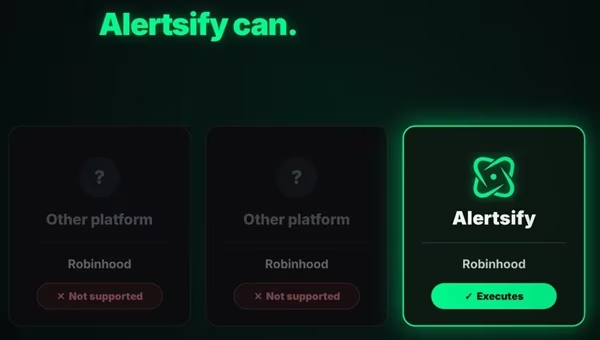
The integration allows you to connect your Robinhood accounts and execute supported trades through Alertsify.
With the integration, you can:
- Execute supported options orders from the chart.
- Copy selected traders into their Robinhood accounts.
- Manage position sizes and trading risk.
- Monitor fills and trading performance.
- Use supported spread-trading functionality.
Robinhood is particularly important to Alertsify’s product positioning because the platform highlights its ability to copy trades into Robinhood accounts.
Who is it for?
Robinhood users who want to execute trades from Alertsify’s charts or automate selected trading activities without manually recreating every order.
2. Webull
Webull is another supported brokerage platform integrated by Alertsify that supports stocks, options, chart-based order execution, and copy trading.
Its features include:
- Executing supported options trades from Alertsify charts.
- Copying selected traders through Alertsify Pro.
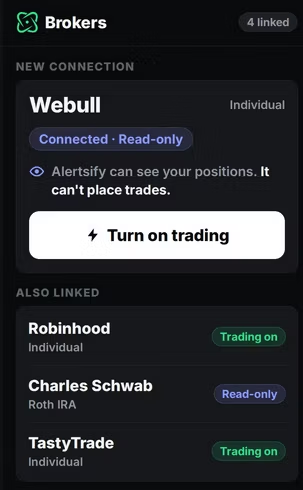
- Monitoring connected-account positions.
- Applying position-sizing and risk settings.
- Tracking trading performance.
Who is it for?
Traders who already use Webull and want to combine their brokerage account with Alertsify’s charting and trade-execution tools.
3. Charles Schwab

Alertsify supports Charles Schwab for connecting a brokerage account and using its trading tools.
The integration supports:
- Chart-based trade execution.
- Supported options and stock orders.
- Copy trading through Alertsify Pro.
- Position monitoring.
- Trading analytics and account tracking.

Users connect through Schwab’s authentication process. The connection starts with read-only access, and trading permissions must be enabled before orders can be placed.
Who is it for?
Schwab customers who want to use Alertsify for chart-based execution, copy trading, and performance tracking.
4. Thinkorswim

Thinkorswim is a trading platform operated by Charles Schwab.
It is important to distinguish Thinkorswim from a separate brokerage company. Users connect their Schwab brokerage account through Alertsify.
The integration supports:
- Trading supported options from Alertsify charts.
- Copying selected traders into the connected Schwab account.
- Monitoring positions.
- Using supported trading automation.
- Managing entries and exits through Alertsify.
Who is it for?
Traders who use Thinkorswim for charting and options analysis but want to execute supported orders through Alertsify.
Important: Thinkorswim is Charles Schwab’s trading platform. When connecting Thinkorswim through Alertsify, you connect the underlying Schwab brokerage account. The 11 entries therefore represent supported broker/platform options, not necessarily 11 completely separate brokerage companies.
So, Alertsify’s broker integrations can also differ in available functionality. Kindly check the connection screen and the specific broker’s integration page before enabling trading.
5. E*TRADE

E*TRADE is another supported brokerage integration that allows users to connect their E*TRADE accounts and access supported trading functions.
These include:
- Chart-based options execution.
- Copy trading through Alertsify Pro.
- Position monitoring.
- Trade analytics.
- Risk and position-sizing controls.
The integration is designed to reduce the need to switch between a charting interface and a brokerage account when executing trades.
Who is it for?
E*TRADE users who want to connect their existing brokerage accounts to Alertsify’s execution and automation tools.
6. TastyTrade

TastyTrade is a brokerage platform popular with active options traders.
Its Alertsify integration supports options trading, copy trading, and chart-based order execution.
Users can:
- Connect their TastyTrade accounts.
- Execute supported options orders from Alertsify charts.
- Copy selected traders through Alertsify Pro.
- Monitor trading activity.
- Use supported position-sizing and risk controls.
Your TastyTrade account must have the necessary options-trading permissions for the relevant contracts.
Who is it for?
Active options traders who want to combine TastyTrade with Alertsify’s charting and trade automation features.
7. Public

Public is included in Alertsify’s current supported broker list.
Its inclusion means Public users can explore the available brokerage connection and supported functionality through Alertsify.
Before relying on a specific feature, you want to check the connection screen to confirm the permissions available for your Public account.
Who is it for?
Public users who want to connect their existing brokerage account to Alertsify rather than managing their trading activity entirely through separate interfaces.
8. MooMoo

MooMoo is another brokerage platform listed by Alertsify.
The integration allows you to connect your MooMoo brokerage accounts and access the functionality available for their connection.
Alertsify’s supported features across its broker integrations include:
- Trading from charts.
- Supported stock and options execution.
- Copy trading.
- Position tracking.
- Trading analytics.
The exact permissions and available instruments should be confirmed in the MooMoo connection flow.
Who is it for?
MooMoo users who want to connect their brokerage account to Alertsify’s trading interface.
9. Alpaca

Alertsify supports Alpaca for connecting brokerage accounts and accessing its trading features.
The integration supports:
- Supported stock and options orders.
- Trading directly from Alertsify charts.
- Copy trading through Alertsify Pro.
- Position monitoring.
- Risk management and position sizing.
Users authenticate through Alpaca’s own connection process. The account starts with read-only access until trading is enabled.
Who is it for?
Traders using Alpaca who want to access Alertsify’s chart-based execution and copy-trading tools.
10. Wealthsimple

Wealthsimple is a Canadian brokerage platform supported by Alertsify.
The integration allows eligible users to connect their Wealthsimple accounts and use the available trading features.
Its supported functions include:
- Connecting a Wealthsimple account.
- Executing supported stock and options orders.
- Copy trading through Alertsify Pro.
- Monitoring account positions.
- Managing supported trading settings.
Wealthsimple users need to ensure their accounts have the required options-trading permissions before attempting options transactions.
Who is it for?
Mostly for Canadian traders who use Wealthsimple and want to connect it to Alertsify’s trading and automation environment.
11. Interactive Brokers

Interactive Brokers (IBKR) is one of the newer additions highlighted in Alertsify’s current broker information.
The integration supports:
- Stock and options trading.
- Chart-based order execution.
- Copy trading through Alertsify Pro.
- Position monitoring.
- Trading through the connected IBKR account.
Alertsify’s November 2026 product updates specifically mention direct trading from the Trade page and Charts, as well as copy trading into Interactive Brokers accounts.
One important detail is that IBKR may require additional account permissions and activation steps before autonomous order execution is available.
The good thing is that you will be shown the instructions during connection.
Who is it for?
Traders who use Interactive Brokers and want to connect their existing account to Alertsify’s charting and automation tools.
What Can You Do With Alertsify’s Broker Integrations?
Supporting multiple brokerage platforms is useful, but the more important question is what the integrations actually allow you to do.
Alertsify combines broker connectivity with charting, order execution, and copy-trading features.

Here are some key functions.
1. Trade Directly from Alertsify Charts
One of Alertsify’s main features is the ability to execute supported trades directly from its charting interface.
Instead of opening a chart on one platform and manually entering the same order into another brokerage application, you can draw your entry, stop, and profit targets on the Alertsify chart.
The platform then sends the supported order to your connected brokerage account.
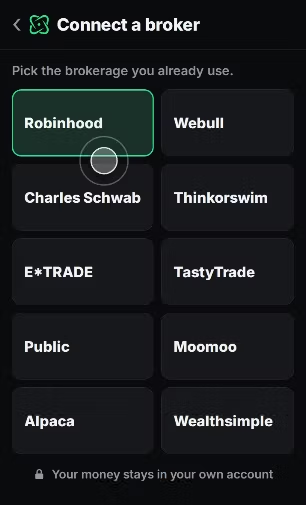
Its chart-based execution features include:
- Entry levels.
- Stop-loss levels.
- Up to three take-profit targets.
- Position sizing.
- Automatic break-even functionality.
This is useful for traders who want their chart analysis and order execution in one interface.
2. Copy Trading Across Supported Brokers
Alertsify Pro includes copy-trading functionality.
You can choose a trader, configure your preferred position size and risk settings, and have supported trades copied into your connected brokerage account.
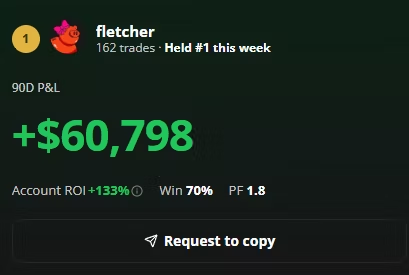
Depending on the available execution mode, you can either approve trades manually or enable automatic execution.
Your broker executes the orders in your own account.
3. Execute Discord Trading Signals
Alertsify also has a Signal feature that allows you to track and execute trading alerts from supported Discord trading communities.
Instead of manually re-entering the details of a trade, you can review a supported alert and send the order to your connected brokerage account.

The feature is particularly relevant to traders who follow options and stock trading communities.
4. Monitor Your Positions and Trading Performance
Connecting a brokerage account also allows Alertsify to track trading activity and display performance information.

Depending on the connection permissions, you can use the platform to review:
- Trade history.
- Entry and exit prices.
- Profit and loss.
- Win rates.
- Position performance.
- Trading activity by ticker.
This helps users evaluate their actual trading performance using connected brokerage data.
5. Trade Options Spreads
Alertsify has also introduced options spread tools.
Its November product updates mention Simple and Pro spread builders, live leg prices, payoff charts, and open/closed spread lists in beta.
The platform’s newer features include spread-related chart and journal functionality.
However, spread execution depends on the supported broker connection, account permissions, and the specific feature’s availability.
Does Alertsify Support Robinhood Copy Trading?
Yes. Robinhood is one of the popular brokerage integrations offered by Alertsify.
When you get started, you can connect your Robinhood accounts and use supported trading and copy-trading features.
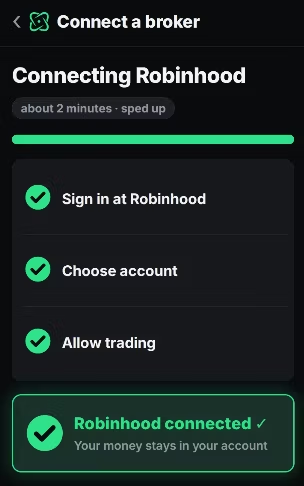
The main advantage is that you don’t have to transfer your money into an Alertsify wallet to use the platform.
Your funds remain in your Robinhood brokerage account, and the broker handles the execution of orders.
That’s the uniqueness of the platform: you connect your broker directly to Alertsify, and your trades are verified directly through your broker.
What of Interactive Brokers?
Does Alertsify Support Interactive Brokers?
Yes. Interactive Brokers is listed on Alertsify’s current website, and its November product updates mention direct trading and copy trading through IBKR.
You can connect your Interactive Brokers accounts and access the supported trading features.
However, kindly note that IBKR may require additional account permissions and activation before certain automated functions can be used.






One Comment