
Alertsify Leaderboard: How to View, Compare & Track Top Traders
Want to see which traders are performing well on Alertsify? That is where the leaderboard comes in.
The Alertsify Leaderboard gives you a way to explore traders, compare their historical performance, and identify accounts you may want to investigate further.
That is to say, instead of relying entirely on trading screenshots or profit claims shared on social media, Alertsify presents performance statistics collected through connected brokerage accounts.
You can explore different trader categories, search for specific accounts, compare performance over different periods, and open individual trader profiles to examine their trading history.
The leaderboard also has a separate Copy Traders section for traders whose activity is available to follow.
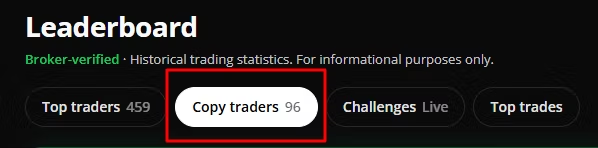
However, seeing a trader at the top of the ranking doesn’t automatically make that person suitable for your account. You still need to understand the figures, trading style, risk, and subscription cost before deciding whether to follow anyone.
In this guide, I’ll show you how the Alertsify leaderboard works, what its statistics mean, how to compare traders, and where to find additional performance information.
What Is the Alertsify Leaderboard?
Alertsify is one of the top crypto tools. Its Leaderboard is a performance-ranking section where you can explore traders and compare their historical trading statistics.
It provides information such as:
- Profit and loss (P&L).
- Return on investment (ROI).
- Win rate.
- Profit factor.
- Trading activity and trade count.
- Subscriber information.
- Historical performance over selected periods.
- Trader profiles and available copy-trading options.
The platform’s leaderboard statistics are broker-verified. What do I mean?
This means the figures are derived from fills reported through connected brokerage accounts rather than simply accepting screenshots or manually entered profit figures.
You can use the leaderboard to research traders before deciding whether to follow them.
Alertsify Leaderboard: Main Features
The leaderboard provides several ways to explore trading activity. Depending on the current interface, you may see sections such as:
| Section | What you can do |
|---|---|
| Top Traders / All Traders | Browse the wider trader list |
| Copy Traders | Explore traders available for copying |
| Challenges | View available trading challenges |
| Top Trades | Examine highlighted trading activity |
| Search | Find a trader by name |
| Time filters | Compare different performance periods |
| Sorting | Rank traders by selected performance metrics |
| Filters | Narrow down the traders you want to examine |
Alertsify Leaderboard Filters

The available filters show time histories such as 30D, 90D, YTD, and All Time, alongside search and filtering controls such as:
- Asset class
- Max price/month
- Min trades
- Account size
- Under $10K
- Min win rate
- Last trade
- Any time
- Last 7 days
- Last 30 days and Trades per week.
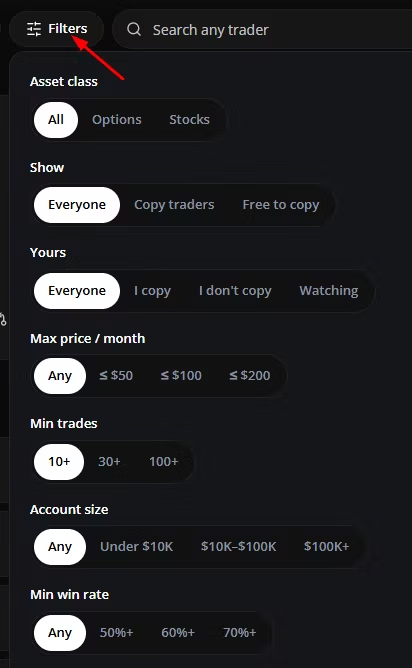
These options matter because a trader who performs well over 90 days may not have the same ranking over the last 30 days or across their entire trading history.
1. Top Traders: Explore the Overall Rankings
The Top Traders section gives you a broader view of the traders appearing on Alertsify.
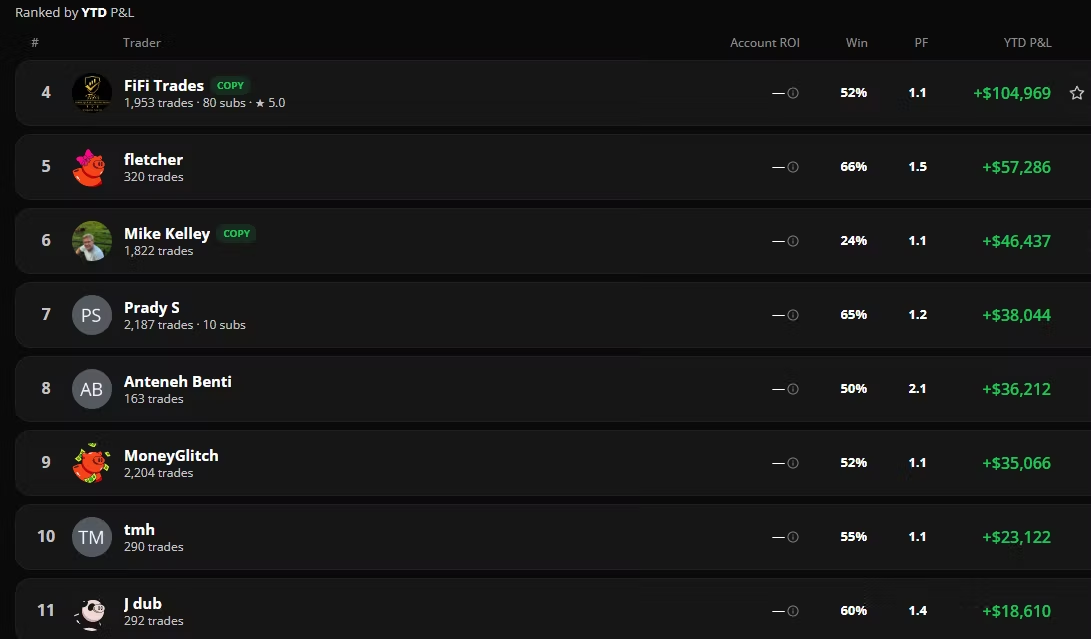
You can compare their historical performance and use the available sorting options to see which accounts rank highly under different metrics.
For example, you may want to start with P&L to see historical profits and losses, then switch to win rate or ROI to understand performance from another angle.
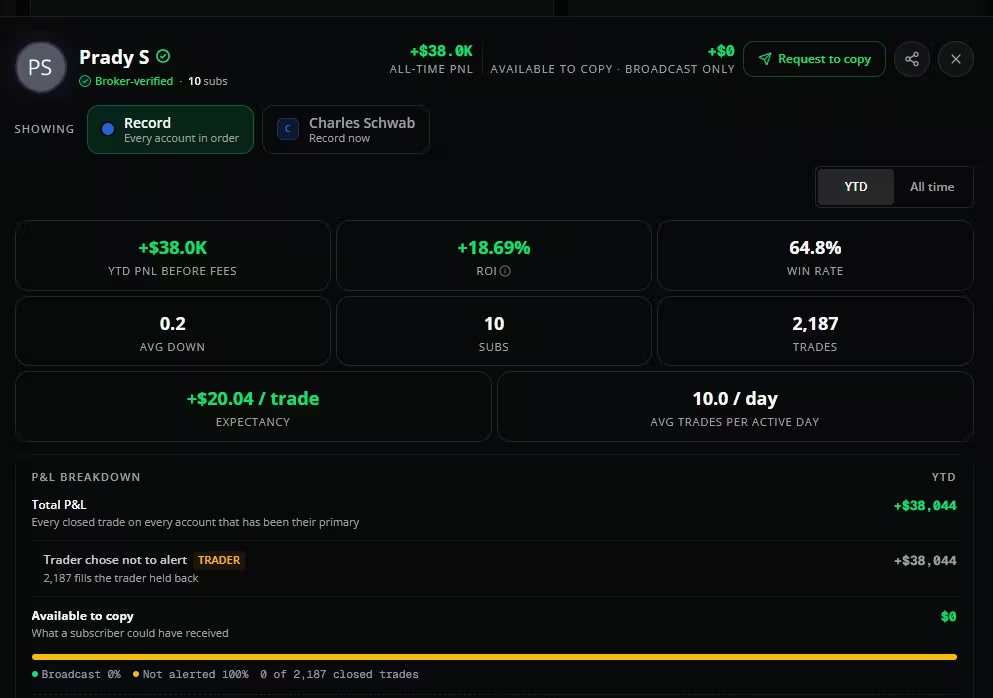
However, don’t stop at the first few names.
A high P&L figure doesn’t tell you how much capital was exposed, how many trades produced the result, or how large the trader’s losing periods were.
Use the rankings as a starting point for research, not as a final decision.
2. Copy Traders: Find Accounts Available to Follow
The Copy Traders section is particularly relevant if you want to follow another trader through Alertsify.

Unlike simply viewing a trader’s historical performance, copying allows supported trading activity to be replicated in your connected brokerage account according to your settings.
If you’re on the Pro plan, you get access to more advanced automated copy trading features, allowing you to automatically copy trades from profitable traders.
It’s also worth noting that some traders are free to follow, while others charge a separate monthly subscription.

That subscription is separate from your Alertsify platform plan.
Before selecting a trader, check the price displayed on their profile and understand what you’re paying for.
If you can trade independently, you don’t need to pay for copy trading. Alternatively, you can follow traders who offer free subscriptions.

3. Challenges: Explore Trading Competitions
The Challenges section is a premium feature that gives you a dedicated space to explore trading challenges and their associated rankings.

How it works:
Traders take a small balance to a target, live, in public. You can join one to copy its trades on your own broker, sized to your balance.
Every trade is a real order on the trader’s own account. The challenge balance is a size limit and a scoreboard, not money we hold.
How to participate:
Because this is a premium offer, you’ll need to be on the Alertsify Pro plan to participate and win the prize money.
Currently, there are over three challenges you can join if you have an account.
4. Top Trades: See Highlighted Trading Activity
The Top Trades section provides another way to explore trading activity.
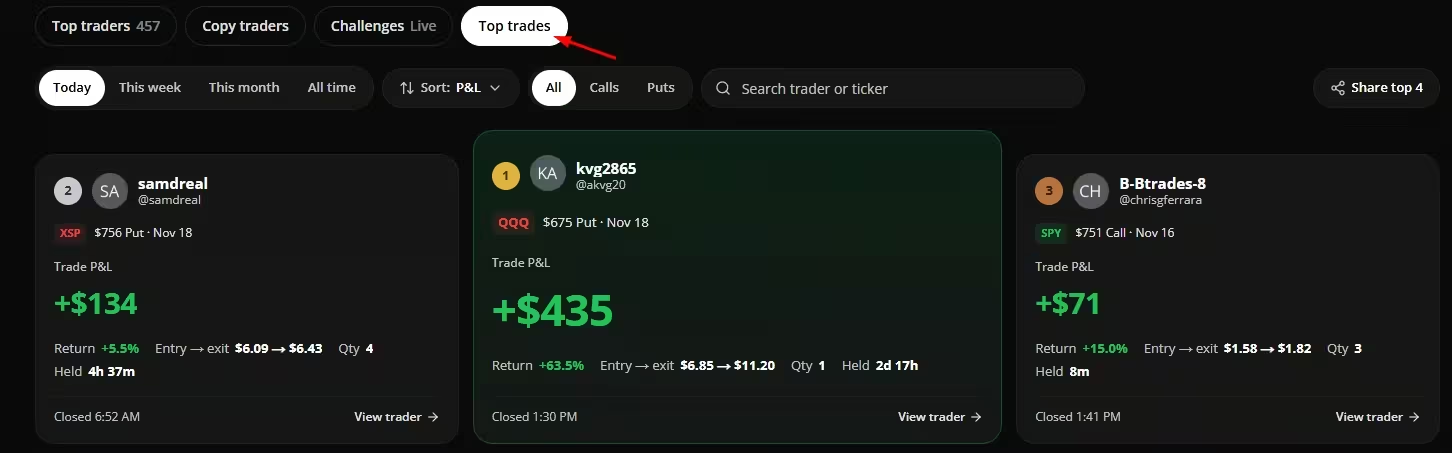
Instead of looking only at the overall trader ranking, you can examine highlighted trades and see which trading opportunities produced notable results.
This can help you understand the kinds of contracts, tickers, or trading activity appearing on the platform.
Don’t rush into copying a trader. You should always examine their wider trading history before concluding.
Why? A single profitable trade doesn’t prove that a trader has a consistent strategy.
When checking the top traders, use the arrow buttons to browse through their trading history and review their previous trades.
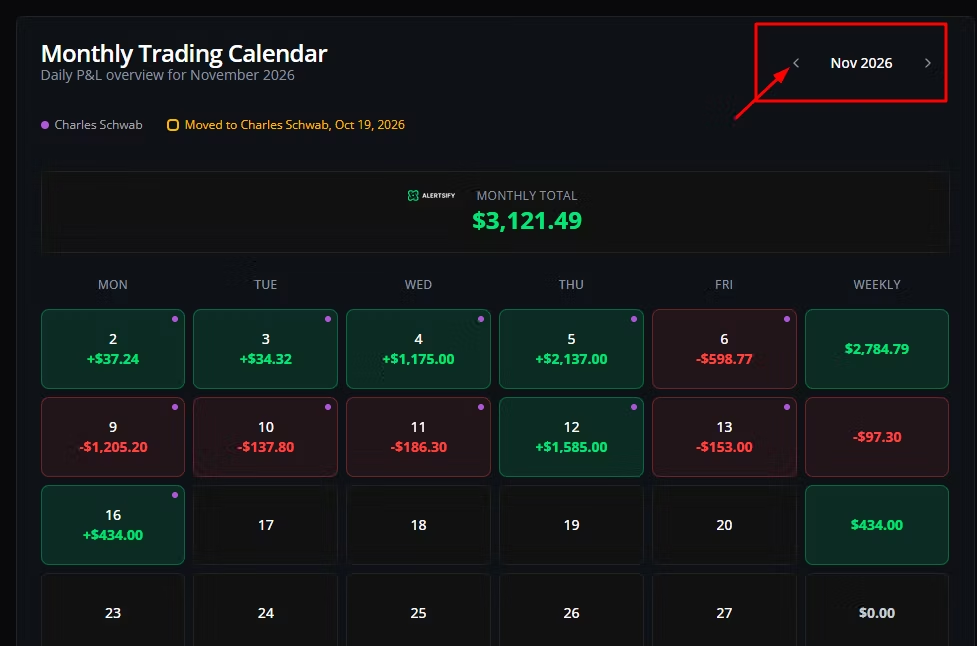
This will help you determine whether a trader has a reliable track record and is worth copying.
Factors to Consider When Choosing a Profitable Trader on the Leaderboard
- Trader rankings.
- 90-day P&L.
- Account ROI.
- Win rate.
- Profit factor.
- Number of trades.
- Subscriber counts.
- Trader subscription prices.
How Are Traders Currently Ranked on the Alertsify Leaderboard?
Trader rankings are now based on their performance over the last 90 days. That’s why you may notice changes in the rankings.
This gives more weight to recent results and allows traders to climb the leaderboard based on their latest performance.
The previous ranking view is still available under “All Time.”
How to Use the Alertsify Leaderboard
You can explore the leaderboard without immediately committing to a paid copy-trading subscription.
Follow these steps.
Step 1. Open the Alertsify Leaderboard
Visit alertsify.com
Open the public leaderboard and explore the available trader categories.
Step 2. Choose a Ranking Category
Start with All Traders if you want a wider overview.
If your goal is to follow another trader, switch to Copy Traders.
This helps you focus on the accounts relevant to your intended use.
Step 3. Select a Time Period
Use the available date filters to compare performance over different periods.

I recommend checking more than one period rather than selecting someone based entirely on a short-term ranking.
Step 4. Sort by Your Preferred Metric
Depending on the available leaderboard controls, you can sort by:
- P&L.
- ROI.
- Win rate.
- Most copied.
- Other available performance metrics, including drawdown.
Try changing the sorting method to see how the ranking changes.
Step 5. Apply Filters
Use the available filters to narrow down the trader list.
The current leaderboard information describes filtering by strategy and account size, which can help you compare traders with more relevant trading profiles.
Step 6. Search for a Trader
If you already have a particular trader in mind, use the search field to find their profile.
You can then examine their historical statistics and available subscription information.
Step 7. Open the Trader’s Profile
Don’t make your decision from the leaderboard row alone.
Open the profile and investigate the available trading history, performance statistics, and other information.
The goal is to understand how the trader performs, not just where they appear in the ranking.
Check out Alertsify, and when you’re ready to get started, don’t forget to take advantage of their discount code to save money when subscribing to a paid plan.
How to Read the Alertsify Leaderboard Statistics
The most important part of using the leaderboard is understanding what each number represents.
Here are the key metrics to examine.
- Profit and Loss (P&L)
P&L shows the historical money gained or lost over the selected reporting period.
For example:
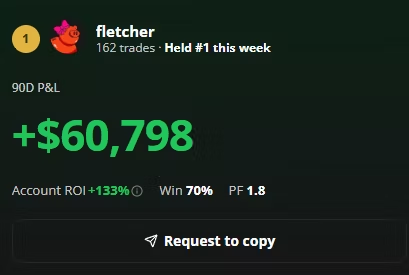
- +$58,149 indicates a positive historical P&L.
- -$29,761 indicates a negative historical P&L.
On your dashboard, you will see both positive and negative results among the ranked copy traders.
That is useful because you can see that the leaderboard is not simply hiding every trader who has lost money.
- Account ROI
ROI means Return on Investment.
It expresses a return relative to the capital base used in the calculation.
For example, a trader showing a 20% ROI has a different performance profile from one showing 5%, even if the second trader has a larger dollar P&L.
You should still examine how the platform calculates the displayed ROI and whether the comparison uses a consistent period and capital basis.
- Win Rate
Win rate shows the percentage of trades that were profitable.
For example, if a trader has a 70% win rate across 100 closed trades, approximately 70 were profitable, and 30 were not.
A high win rate can look attractive, but it doesn’t automatically mean a trader is profitable.
A strategy can win frequently and still lose money if its losing trades are much larger than its winning trades.
Always consider win rate alongside P&L, profit factor, and drawdown.
- Profit Factor (PF)
Profit factor compares gross profits with gross losses.
A simplified example:
- Gross winning trades: $10,000.
- Gross losing trades: $5,000.
- Profit factor: 2.0.
This means the trader generated $2 in gross profits for every $1 lost over the measured period.
A higher profit factor can indicate a stronger historical balance between gains and losses, but you should still consider trade count and the selected reporting period.
- Maximum Drawdown
Maximum drawdown measures the largest decline from a previous account or performance peak to a subsequent low during the measured period.
This is one of the most important metrics when evaluating someone you might copy.
For example, imagine two traders:
- Trader A generated a 30% return with a 25% maximum drawdown.
- Trader B generated a 20% return with a 7% maximum drawdown.
Trader A has the higher return, but Trader B experienced a smaller historical decline.
Depending on your account size and risk tolerance, the second profile may deserve closer attention.
The current Alertsify leaderboard information highlights drawdown as an important comparison metric.
- Trade Count
Trade count tells you how many trades contributed to the displayed performance.
This helps you distinguish between a longer trading record and a small number of recent results.
For example, a trader with 300 recorded trades gives you more historical activity to examine than someone with only eight.
However, more trades do not automatically mean better performance. You still need to examine the results and consistency.
- Subscribers
Subscriber numbers show how many people have subscribed to a trader.
This can indicate popularity, but it is not a performance guarantee.
A trader with hundreds of subscribers can still experience losses.
Don’t use subscriber count as a substitute for analysing the trading record.
Is the Alertsify Leaderboard Free?
Yes. Alertsify offers free access to its public leaderboard.
You can browse traders and examine their historical statistics without paying for a copy-trading subscription.
However, viewing a trader and executing their trades are two different things.
Alertsify’s current pricing information distinguishes between:
- Free: View trader statistics and the leaderboard.
- Lite: Access supported broker connections and manually approve trades.
- Pro: Access automatic copy trading.
You can read our complete Alertsify pricing guide for the latest subscription costs.
Alertsify Leaderboard vs Alertsify Reports: What's the Difference?
These two resources serve different purposes.
The Leaderboard helps you compare individual traders and their historical performance.
The Reports section provides aggregated information about trading activity across Alertsify members.
For example, the September 2026 Options Report covers:
- Options contracts traded.
- Calls versus puts.
- Expiration dates.
- Most-traded underlying assets.
- Time of day.
- How long positions were held.
The report describes activity from Alertsify members’ actual filled options trades. It is not a list of the best traders.
This distinction is important:
| Feature | Leaderboard | Reports |
|---|---|---|
| Main purpose | Compare trader performance | Understand platform-wide trading activity |
| Focus | Individual traders | Aggregated member activity |
| P&L rankings | Yes | Not the main purpose |
| Win rate | Trader-level statistics | Not the main purpose |
| Options activity | Can appear in trader records | Analysed across members |
| Best use | Research traders | Study trading trends |
Explore the Alertsify Reports page for its published monthly options reports.
Does Alertsify Verify Leaderboard Results?
Alertsify says its leaderboard performance figures are derived from connected brokerage fills.
This means the platform uses information from the trader’s connected brokerage account rather than accepting a manually submitted profit screenshot as proof.
According to Alertsify’s transparency information, its records include trade details such as entry prices, exit prices, quantities, timestamps, and resulting P&L.
However, broker-verified does not mean a trader is guaranteed to be profitable in the future.
It also does not mean Alertsify independently guarantees every result beyond the information reported by the connected broker because past results are not a promise of future returns.
You should still review the full trading history and risk information before following anyone.
| Feature | Leaderboard | Reports |
|---|---|---|
| Main purpose | Compare trader performance | Understand platform-wide trading activity |
| Focus | Individual traders | Aggregated member activity |
| P&L rankings | Yes | Not the main purpose |
| Win rate | Trader-level statistics | Not the main purpose |
| Options activity | Can appear in trader records | Analysed across members |
| Best use | Research traders | Study trading trends |
Explore the Alertsify Reports page for its published monthly options reports.
Can You Copy Traders Directly from the Alertsify Leaderboard?
Yes. Alertsify supports copy trading through its Pro subscription.
You can browse available traders, review their performance, select the ones you want to follow, and configure your own position sizes and risk settings.
Depending on your settings, supported trades can be automatically executed or sent for your approval.
Your funds remain in your connected brokerage account. Alertsify sends the authorised trading instructions to your broker.
Remember that due to differences in execution timing, your actual trade fills may differ from those of the trader you’re copying.
Factors such as execution prices, slippage, market liquidity, and other market conditions can affect your results.
| Feature | Leaderboard | Reports |
|---|---|---|
| Main purpose | Compare trader performance | Understand platform-wide trading activity |
| Focus | Individual traders | Aggregated member activity |
| P&L rankings | Yes | Not the main purpose |
| Win rate | Trader-level statistics | Not the main purpose |
| Options activity | Can appear in trader records | Analysed across members |
| Best use | Research traders | Study trading trends |
Explore the Alertsify Reports page for its published monthly options reports.
Frequently Asked Questions
How does Alertsify rank traders?
Alertsify uses standardized performance metrics applied across eligible traders. Available ranking options include P&L, ROI, win rate, and other performance measures. Rankings are historical information, not recommendations.
Can I search for a specific trader?
Yes. You can use the leaderboard’s search function to find a trader by name.
What is the difference between Top Traders and Copy Traders?
Top Traders provides a broader view of trader rankings. Copy Traders focuses on accounts whose trading activity is available for you to follow through Alertsify’s copy-trading functionality.
Does a high P&L mean a trader is good?
Not necessarily. You should also examine drawdown, trade count, win rate, profit factor, consistency, and trading style.
Are Alertsify leaderboard results verified?
Alertsify states that its performance statistics are derived from connected brokerage fills. This is different from accepting screenshots or self-reported trading results.
What is the Alertsify Reports page?
The Reports page contains aggregated trading information, including monthly options activity across Alertsify members. It is different from the individual trader leaderboard.
Does Alertsify recommend the highest-ranked traders?
No. Alertsify describes its rankings as informational and does not recommend or endorse specific traders. You are responsible for deciding whom to follow.
Final Thoughts: How Useful Is the Alertsify Leaderboard?
The Alertsify Leaderboard gives you a useful starting point for researching trading performance.
You can compare traders, examine historical P&L, check win rates, review other performance statistics, and investigate accounts available for copy trading.
Its broker-connected data is particularly useful because it provides a different level of transparency from relying on trading screenshots shared on social media.
However, don’t select a trader simply because they appear at the top.
Like other digital trading platforms, look beyond P&L, examine drawdown, compare several time periods, and investigate the trader’s full history.
If you intend to copy someone, also consider whether their trading style and position sizes are suitable for your account.
For the next step, read our guide on how to find the best Alertsify traders.